
Importing Solutions
Admin Settings
To import into the Solutions engine, click the settings icon in the bottom left to initiate.
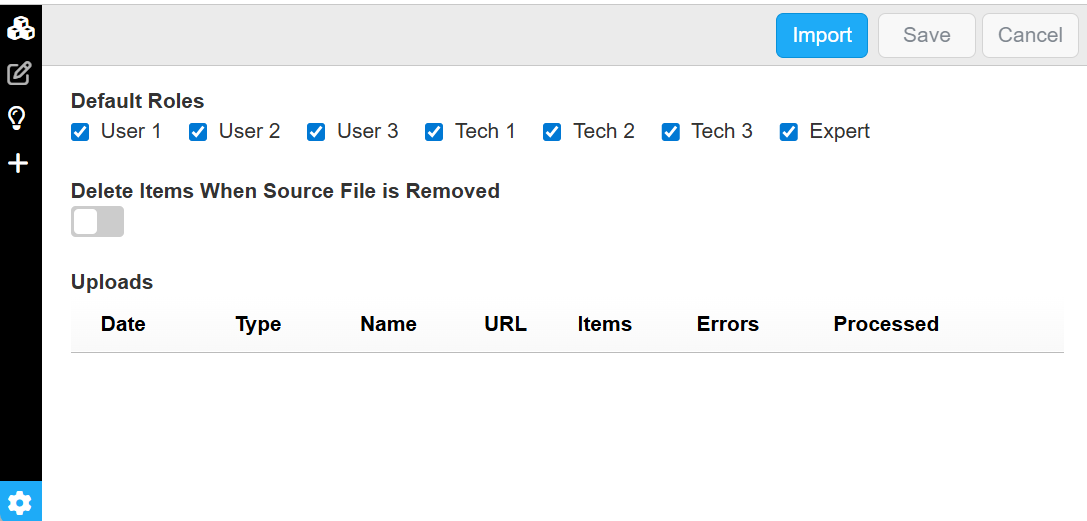
Default Roles
The default roles for new generated items
Source File Removal
Disabled (Default)
- Source items that are not used by any generated content are removed
- Source items that support generated content are kept
- Generated content (FAQs, procedures, etc.) is always preserved
Enabled
- Only content supported by the current uploaded source files are retained
- When a source file is removed:
- All associated source items are deleted
- Any generated content that depends on those items is also removed
Import
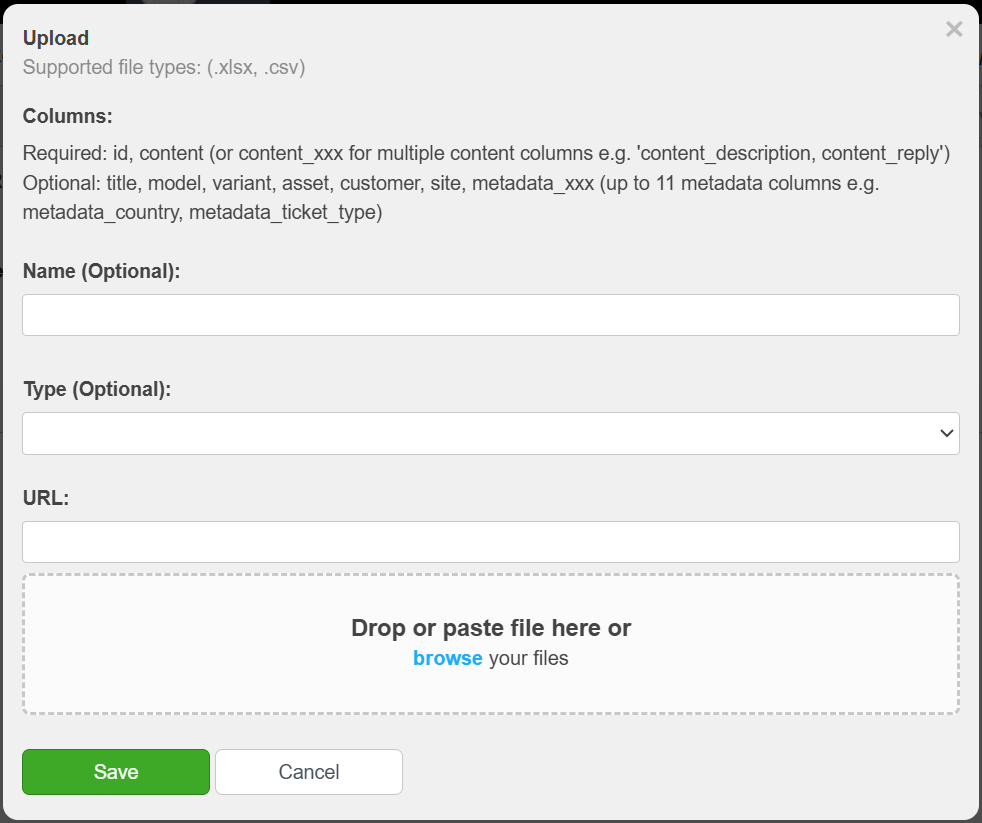
Supported File Types
.xlsx, .csv
Columns
Required:
- id
- content (or content_xxx for multiple content columns e.g. 'content_description, content_reply')
Optional:
- title
- model, variant, asset, customer, site
- metadata_xxx (up to 11 metadata columns e.g. metadata_country, metadata_ticket_type)
Scoring
Content Eligibility
Some items are automatically excluded before scoring:
- Content that is too short (less than ~275 characters or ~20 words)
- Administrative or coordination-related information
- Logistics or supply chain details (availability, lead times, inventory)
- Policy, warranty, claims, or pricing-related content
Scoring Criteria (1–5 Scale)
Each item is evaluated based on its reusable technical value:
5 — Complete & Reusable Technical Content
End-to-end troubleshooting, full procedures, or comprehensive guidance
4 — Strong Technical Content
Detailed and reusable content such as specifications, configurations, or partial procedures
3 — Partial Technical Value
Useful technical insight, but incomplete or requires additional context
2 — Limited Technical Value
Minimal or highly context-dependent information (e.g., simple lookups or codes)
1 — Non-Technical or Excluded Content
Administrative, commercial, or otherwise not useful for technical knowledge reuse
Clustering
- Items with a score greater than 1 are grouped into clusters
- Each cluster receives a cluster score (average of item scores)
- Only clusters with a score of 3 or higher are included in the final results
UI Score
We present a simplified version of our internal scoring in the UI:
1 — Excluded (score < 1 or cluster score < 3)
2 — Moderate relevance (score 2-3)
3 — High relevance (score > 3)
1. Upload Tickets (Data Ingestion)
The process begins by feeding the system the raw "memory" of your support interactions.
-
Source Material:
You can upload collections of customer service tickets, call logs, or email threads in.xlsxor.csvformat. -
GPT Analysis:
Once uploaded, the InSkill engine analyzes these records to identify recurring problems and the most successful fixes, clustering them into Proposed Solutions.
2. Approve Solutions (Expert Verification)
Before a recommendation is ever shown to a technician or customer, it must pass through a human expert.
-
Refining the Output:
In this stage, you review the connections and recommendations made by the GPT. -
Quality Control:
You can edit the verbiage, combine similar entries, or delete incorrect suggestions to ensure the knowledge base reflects your organization's Gold Standard for support.
3. Publish Solutions (Deployment)
Once a solution is approved, the final step is to make it live.
-
Going Live:
Publishing a solution adds it to the active search index for your Copilot. -
GPT Integration:
When a user asks a matching question, the GPT will now provide the exact, verified verbiage from the published solution, ensuring consistency across every support channel.
Generated Artifacts
Frequently Asked Question (FAQ)
Answers to common questions
Procedure
Repeatable workflows such as maintenance tasks, setup and commissioning steps, and standard operating procedures (SOPs).
Troubleshooting
- Symptoms, indicators, causes, and resolutions
- Step-by-step corrective actions
- Safety notes, required tools, and replacement parts (when applicable)
Reference
- Technical Specifications - Operating ranges, environmental limits, performance characteristics, capacities, tolerances, etc.
- Configuration - Parameter definitions, acceptable ranges, how settings interact, and how configuration choices affect system behavior.
- Application Guidance - When and where to use specific equipment or configurations, including selection and deployment considerations.
- Best Practices - Field-proven recommendations, optimization tips, and common pitfalls.
Updated about 2 months ago