
Periscope Mode
Periscope Mode: High-Level Task Navigation
While standard diagnostic sessions in InSkill are designed to be followed linearly, Periscope Mode provides a non-linear alternative for users who need a broader perspective. This feature allows you to bypass the traditional step-by-step flow in favor of a bird's-eye view.
Key Features of Periscope
Periscope transforms the Task interface from a guided walkthrough into an interactive outline:
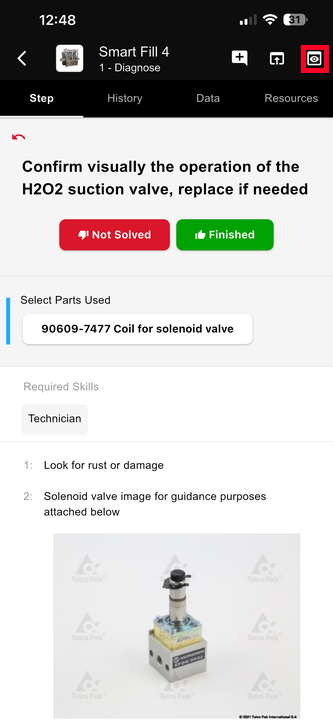
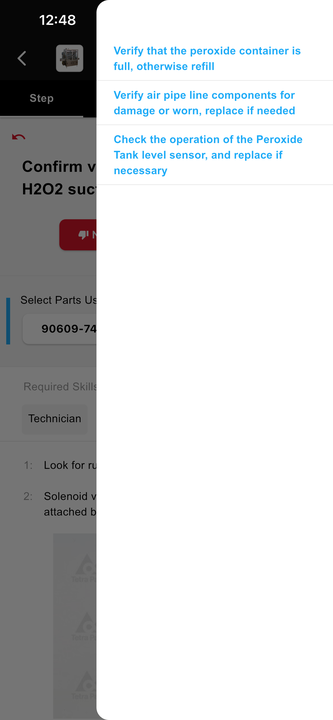
-
Outline View:
Instead of seeing one instruction at a time, you are presented with a complete overview of the diagnostic session. -
Step Jumping:
This mode allows you to instantly jump to any specific step within the procedure. This is particularly useful for experienced technicians who already know the initial steps and need to access a specific calibration or verification point quickly.
When to Use Periscope
-
Expert Troubleshooting:
When a technician is already familiar with the machine and only needs to document a specific part of the repair. -
Quick Reviews:
When you need to verify a specific specification or value found deep within a multi-step task without clicking "Next" repeatedly. -
Non-Linear Repairs:
When the physical repair requires jumping between different subsystems that are covered in different parts of a single task.
Note:
Because Periscope allows for skipping steps, it should be used with caution to ensure that critical safety checks or data-entry requirements in earlier steps are not overlooked.
Updated 3 months ago