
Summary
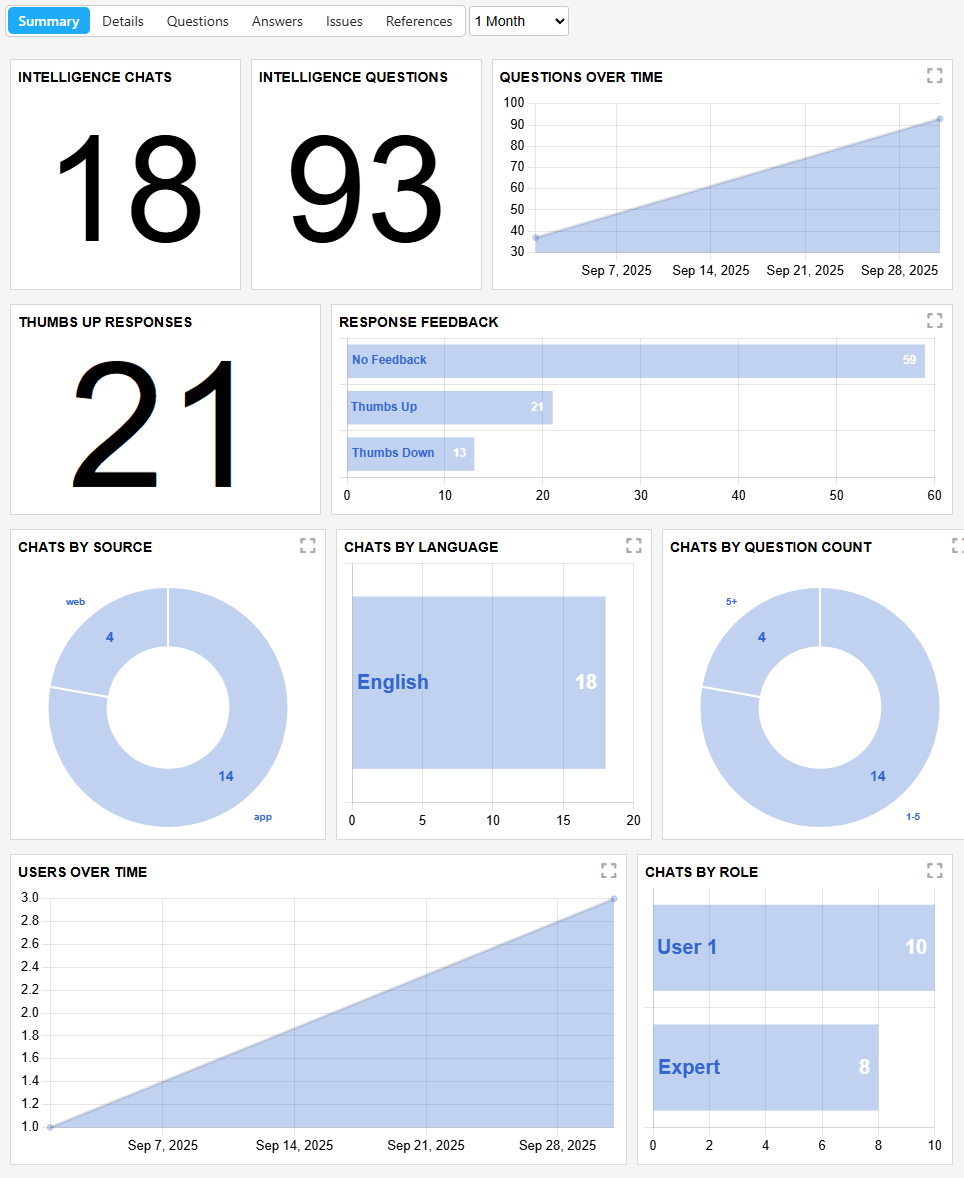
The summary page will give you a general overview of many metrics you can measure within the intelligence portal. Here you can get a broad view of the activity within your account, being able to view things such as number of chats with GPT, feedback of responses (positive or negative - thumbs up vs thumbs down), sources of your chats (web or app), which languages were used, changes over time, quantity of questions by role or product and more.
| Report Type | Description |
|---|---|
| Intelligence chats | Displays the total number of individual chat sessions users have initiated with the system. Note: a single chat session may contain multiple questions. |
| Intelligence questions | Represents the total volume of questions submitted to the system across all chat sessions. |
| Questions over time | Visualizes the cumulative number of questions asked over a specified time period. Each data point builds on previous days’ totals to illustrate long-term engagement trends. |
| Thumbs up responses | Shows the total number of responses that received a “Thumbs Up” rating, indicating positive user feedback on the quality and helpfulness of the answer. |
| Response feedback | Summarizes user feedback on system responses in a bar-chart format. Feedback categories include Thumbs Up, Thumbs Down, and No Feedback. |
| Chats by source | Highlights system usage by reporting the number of chat sessions originating from each connected data source, helping evaluate the value and adoption of different resources. |
| Chats by language | Breaks down chat sessions by the language used, helping evaluate multilingual engagement and adoption across different user groups. |
| Chats by question count | Analyzes chat length by categorizing sessions based on the total number of questions asked in each chat, offering insight into engagement depth. |
| Users over time | Tracks the growth and activity of your user base over time by reporting the total number of unique users within each time period. |
| Chats by role | Categorizes and totals chat sessions based on the user’s assigned role, providing visibility into usage patterns across organizational roles. |
| Questions by product | Displays the distribution of questions asked across specific copilots, helping identify high-interest or frequently utilized tools. |
| References by type | Summarizes the number of references made, organized by reference category, to understand how users leverage system knowledge sources. |
| Agents by type | Reports the total count of each type of GPT agent used, highlighting adoption patterns across different agent configurations or capabilities. |
Updated about 2 months ago