
User Log
What is the user log?
The User Log is a feature that allows you to view the history of all the users on your account. You can view which users did what, when they did it, which copilot was used, and more.
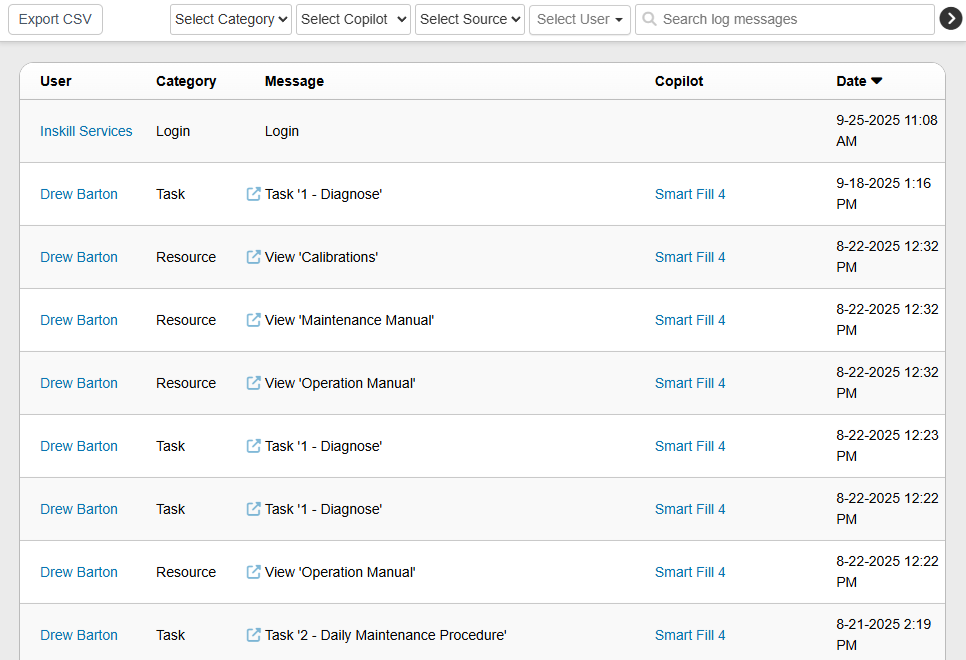
Features on the user log
- User: This is the specific user that you will be viewing the history of.
- Category: This shows what feature the user has used, be it logging into InSkill, viewing a resource, or running a task in a copilot.
- Message: This will show more information about what the user has done, for example showing the specific task or resource used by the user.
- Copilot: This is the copilot the user used. This is also a link to the specific copilot for quick access.
- Date: This is the time at which the user performed this task.
Extra features
- Export CSV: This allows you to export an Excel document with the full user log in it.
- Select Category, Copilot, Source or User: These are all filters to help search for a specific user or event.
- Search log messages: If you have a specific message you want to look for, you can search for it here.
Updated about 2 months ago