
Step Explorer View
The Step Explorer shows every step of a task in one table — order, content, feedback, dependencies, tags, and more — with column, search, and filter controls.
The Step Explorer shows every step of a task in one table, so you can review a whole task at a glance: which steps have content, which collect feedback, what dependencies and tags they carry. To open it, select a task and click the Step Explorer icon on the left edge of the Task Editor.
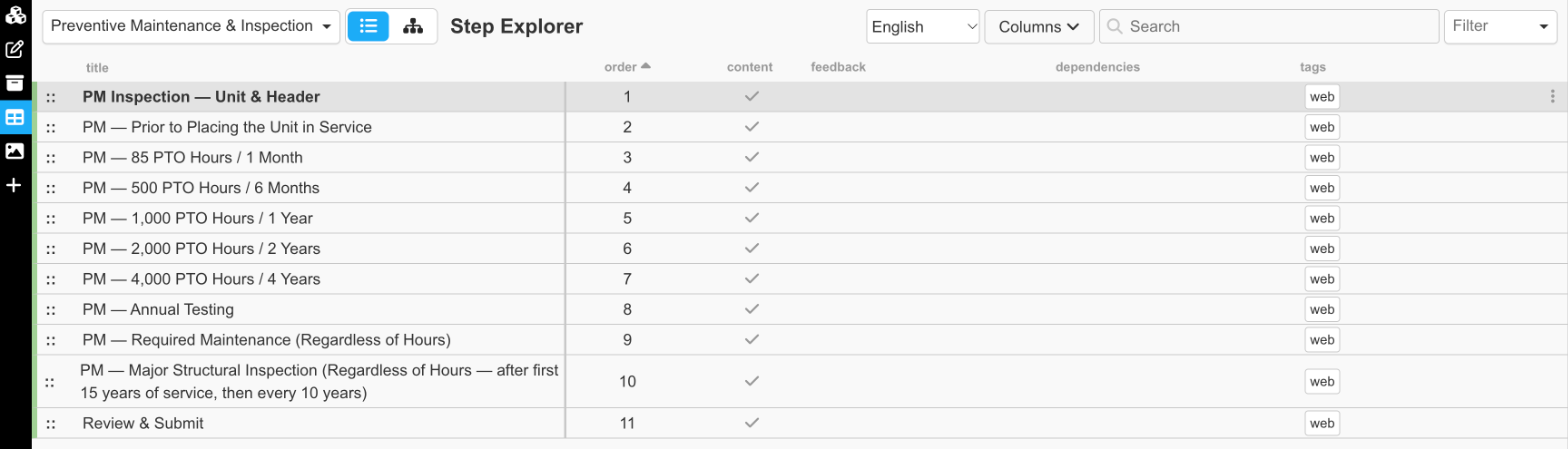
The Step Explorer
Click a step to open it in the Authoring View for editing. The vertical ... menu at the end of a row offers the same actions as the step menu in the Authoring View: Add new, Delete, Unpublish, Copy URL, and Copy Step.
The Toolbar
| Control | What it does |
|---|---|
| Task picker | Switches to another task in the copilot. |
| List and tree buttons | Show the steps as a flat list, with a four-dot handle to drag a step to a new position, or as a tree that shows the task's structure. |
| Language | Shows the step titles in another of the account's languages. |
| Columns | Chooses which columns the table shows. |
| Search | Finds the steps that match what you type. |
| Filter | Shows only the steps that match the filters you pick. |
Columns
The table always shows title and order. By default it also shows content, feedback, dependencies, and tags. Open Columns to add or remove columns:
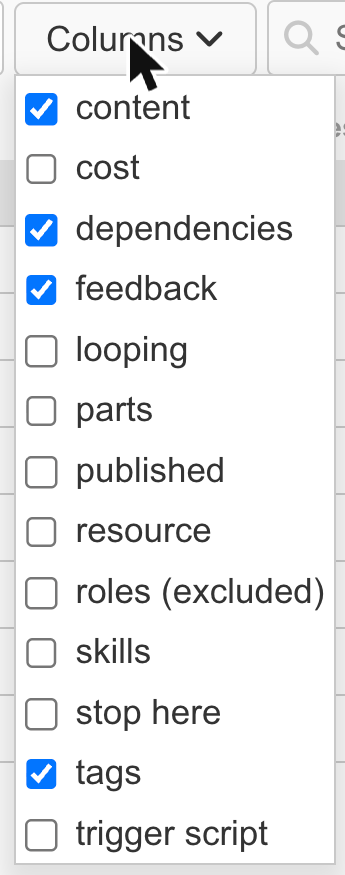
The Columns menu
| Column | What it shows |
|---|---|
| content | A check when the step has content. |
| feedback | The step's feedback variable, if it collects data. See Choosing the Step Type. |
| dependencies | The conditions required for the step to be shown. See Dependencies. |
| tags | The tags applied to the step. |
| looping | Whether a subtask step can run more than once in a session. |
| parts | The parts required to complete the step. |
| published | Whether the step is published. |
| resource | The resource the step uses. |
| roles (excluded) | The user levels the step is hidden from. |
| skills | The skills required to complete the step. |
| stop here | Whether the task ends at the step. |
| trigger script | Whether the step triggers the copilot's session script. |
Most of these values are set on the step's Info tab.
Filter
The Filter list narrows the table to the steps that match:
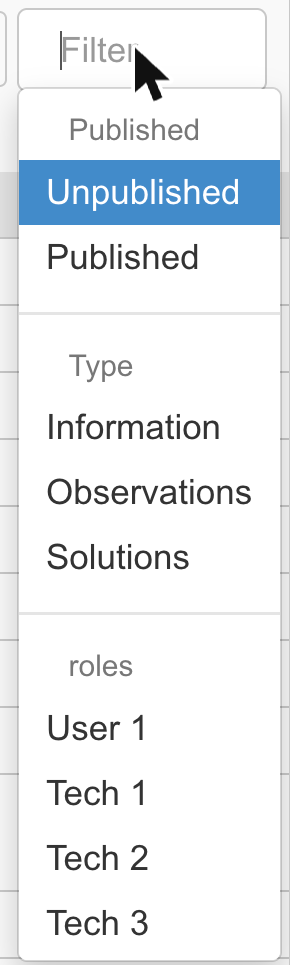
The Filter list
| Group | Options |
|---|---|
| Published | Unpublished, Published |
| Type | Information, Observations, Solutions |
| roles | The account's user levels, such as User 1 and Tech 1–3 |
Updated 20 days ago