
Escalate
Hand a session to another Technician with a handoff code, or route it to support with an escalate task.
If you get stuck, need specialized assistance, or need to end a session, tap Escalate in the top-right corner of the task interface. You get two options: route the job to support, or hand it to another Technician.
An answer can be escalated the same way: the last control under an answer opens the copilot's escalate task, carrying the question with it. See Asking Questions.
Escalate Task
An escalate task is a smart directory curated by your administration team. Rather than hunting for who to call, it gives you a direct path to the person or department qualified to handle that machine or issue — a support representative, an email address, or an internal help site. It collects what the responder needs, such as the serial number, a call-back number, and a description of the problem.
To set which task a copilot uses for this, see Copilot Settings.
Handoff Code
A handoff code is a digital bookmark that passes a job to another Technician or a different shift.
- The code: InSkill generates a unique alphanumeric code for your active session. The code is single use and expires in two days.
- Sharing it: Copy to Clipboard puts the code on the device's clipboard, and Email opens a message with the code in it.
- Takeover: when the next person enters that code on their own device, the task resumes exactly where you left off. They can accept it in either the InSkill app or the browser.
- Data preservation: all previous inputs, photos, and completed steps carry over, so the next Technician does not restart the procedure or re-read the history.
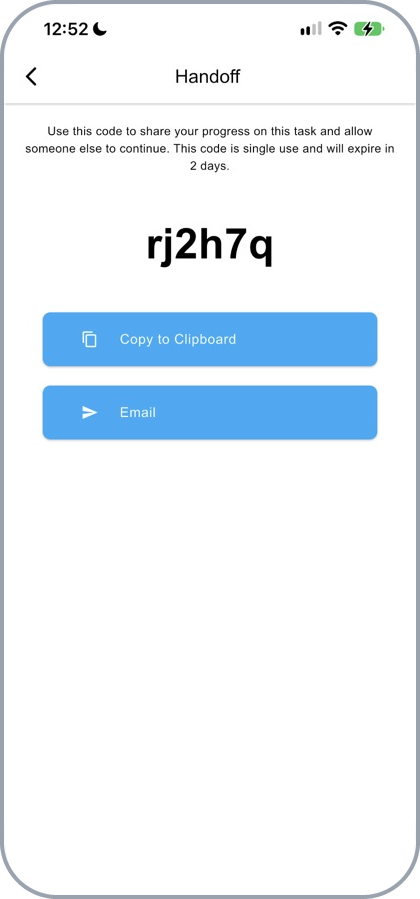
A handoff code, ready to copy or email
NoteHandoff codes are time-sensitive and expire for security reasons. The person accepting the session must also be authenticated on the account.
For the receiving side of this, see Accept Handoff.
Choosing Between Them
| Option | Best used for |
|---|---|
| Escalate Task | When you need external support or a specialized Technician. |
| Handoff Code | When shifting work to another person, or continuing it later. |
Updated about 4 hours ago