
Atlas Card
A complete Atlas Card for the AM-650 hoist and body, what each of its sections captures, and how to build one from photos and field records with the InSkill Field Card Creator skill.
An Atlas Card is the picture-first card. It covers one area of a machine and answers two questions Technicians ask all the time: "where is it?" and "what does it look like?" Each picture says what you see, why it matters, and which card explains the fix. For how Atlas Cards fit with the other card types, see Field Cards.
This page shows a complete Atlas Card, explains what each section captures, and then shows how to create one with the InSkill Field Card Creator skill.
NoteThe example is built from fictional AZ Copper Works records and the AZ Machine Works AM-650 manuals. Its pictures are illustrations marked For demo purposes only. A real atlas uses the site's own photos.
The Example Card
| Item | Detail |
|---|---|
| Card ID | ACW-AZMachineWorks-AM650-Truck-A-001-EN |
| Title | Hoist and body: where things are and what they look like |
| Copilot | Copilot (Truck), AZ Machine Works |
| Equipment | AMW AM-650 rigid haul truck |
| Subsystem | Hoist system, body, prop pin, hydraulic tank |
| Model years | MY2025 (Series II) and MY2022 (Series I); values from the 2025 manuals |
| Pages | 4, with 10 figures |
| Status | Field-derived, version 0.1, review by 2027-01-29 |
| Source | AZ Copper Works field records, July to September 2026 (fictional demo data), checked against the AMW AM-650 2025 service manual (SM) and maintenance and parts manual (MP) |
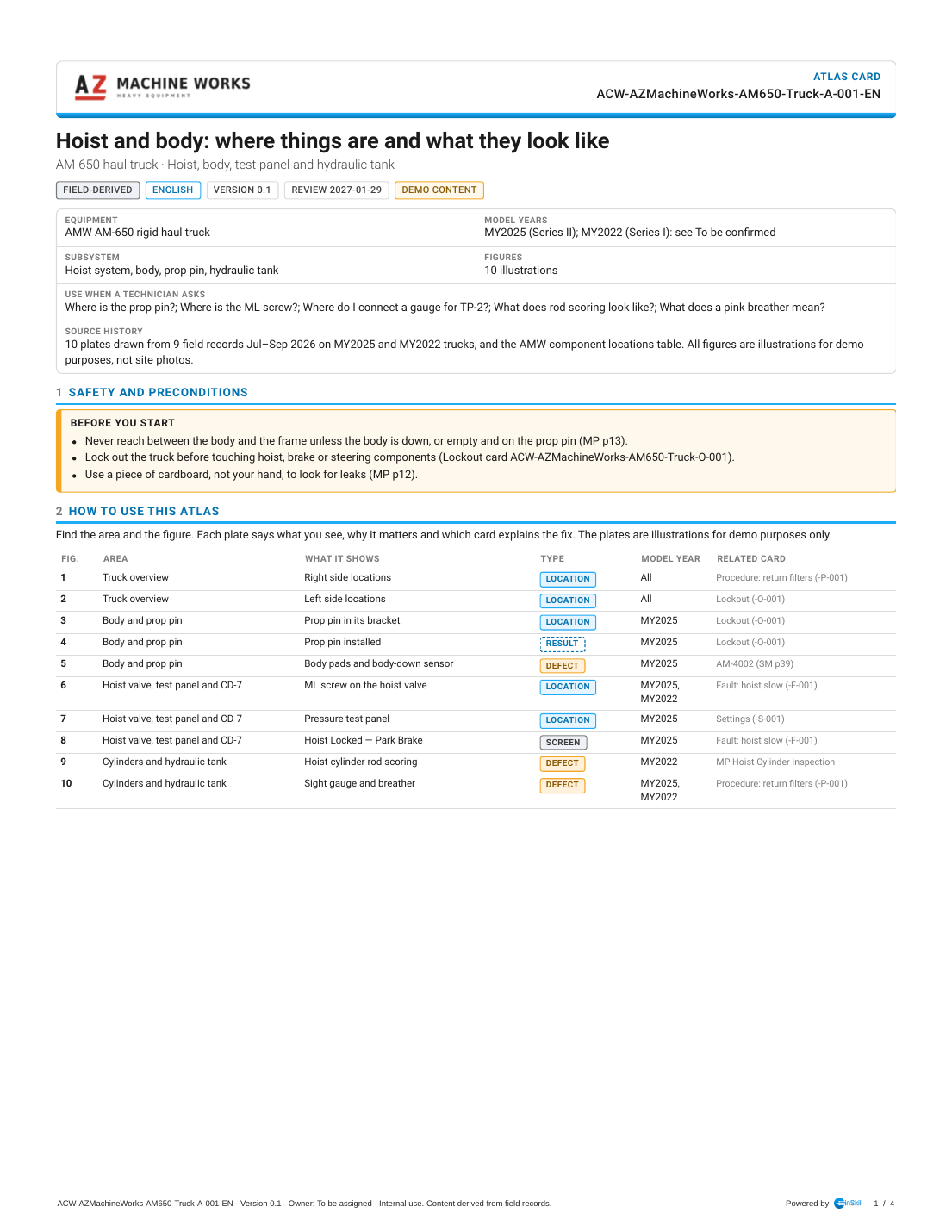
Atlas Card A-001, page 1 of 4
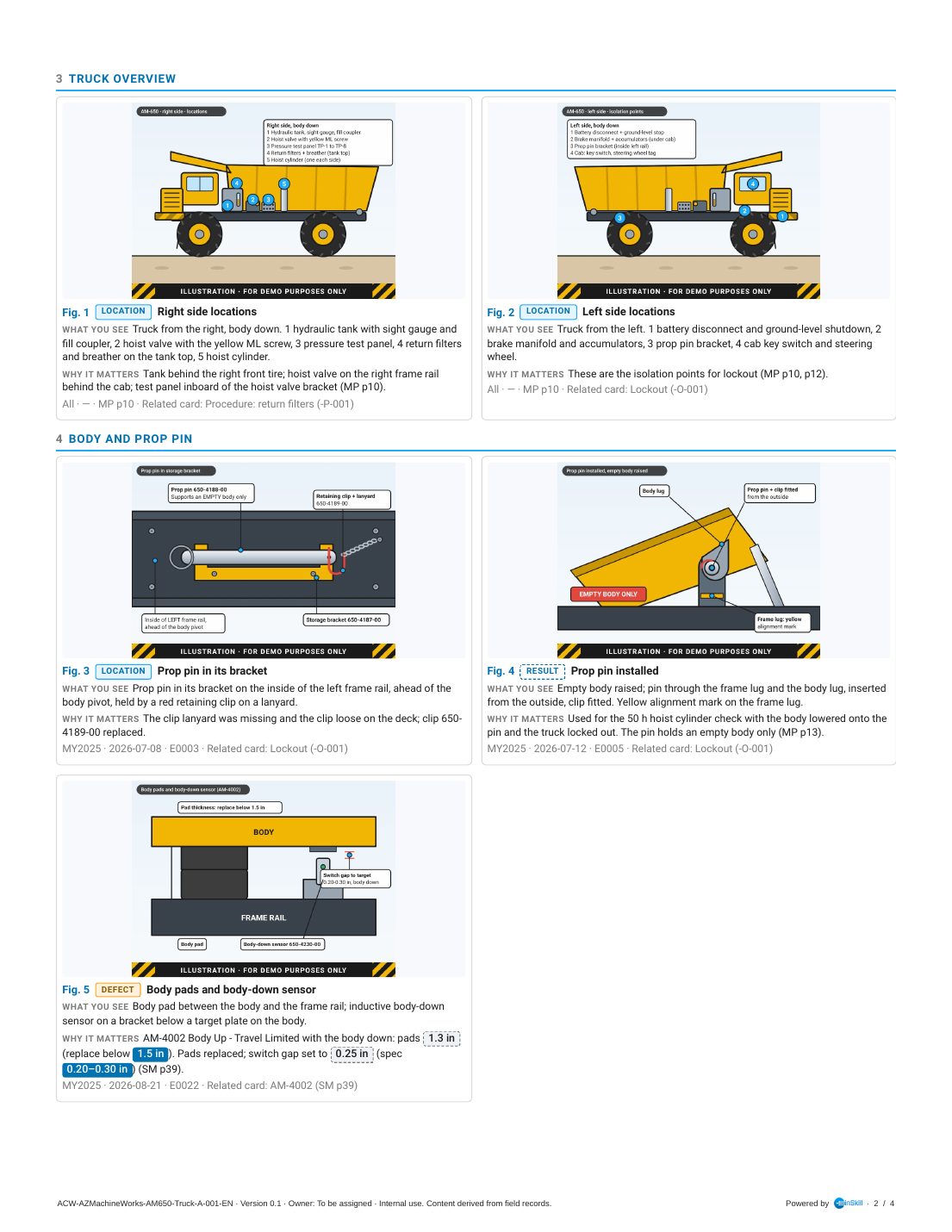
Atlas Card A-001, page 2 of 4
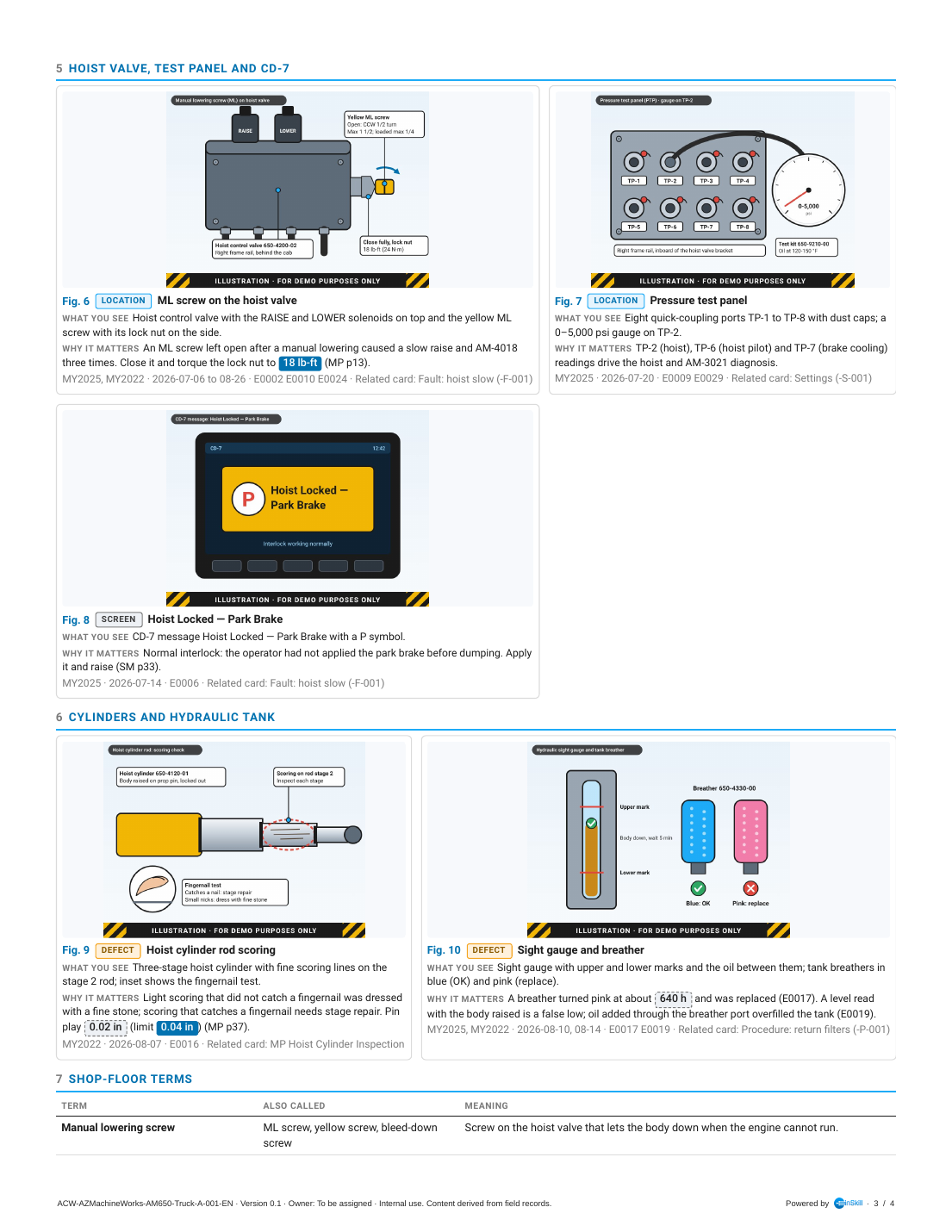
Atlas Card A-001, page 3 of 4
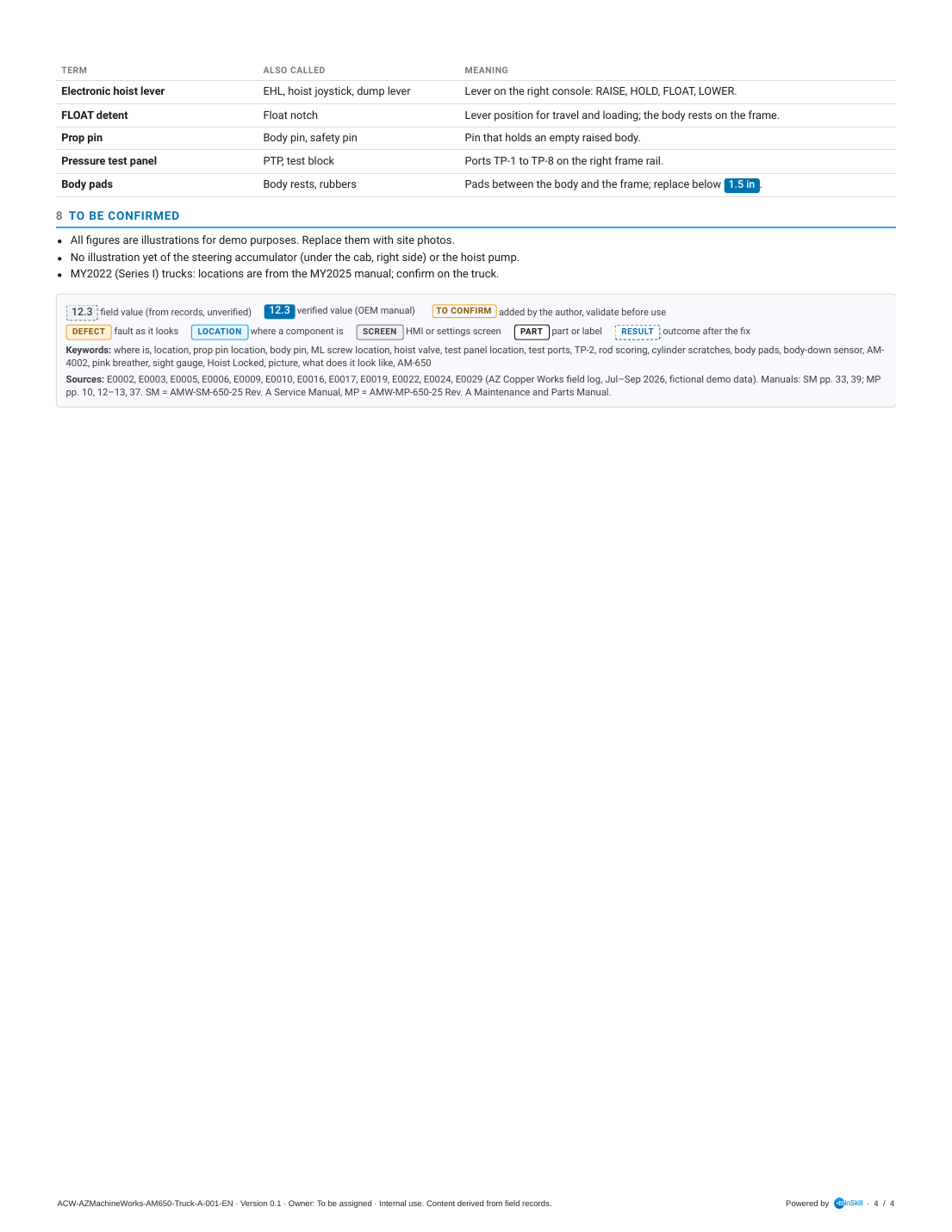
Atlas Card A-001, page 4 of 4
What Each Section Covers
An atlas starts with a figure index so Technicians can find a picture fast. Photo plates start on page 2 and are grouped by area.
| Section | What it captures | In this example |
|---|---|---|
| Header and summary box | The customer logo, card type, card ID and chips. The summary box gives the equipment, model years, subsystem and figure count, plus Use when a Technician asks: the "where is" and "what does it look like" questions the atlas answers. | Atlas card; ten figures; questions such as "Where is the prop pin?" and "What does a pink breather mean?". |
| 1 Safety and preconditions | What to do before reaching into the machine to look at the parts shown. | Never reach between the body and frame unless the body is down, or empty and on the prop pin; lock out first. |
| 2 How to use this atlas | A short how-to, then the figure index: figure number, area, what it shows, figure type, model year and related card. | Ten rows, from right side locations to the sight gauge and breather. |
| 3 to 6 Area plates | One section per area. Each plate has the picture, a figure number, a type tag, What you see (only what is visible), Why it matters (from the records), and the model year, date, source and related card. | Truck overview; body and prop pin; hoist valve, test panel and CD-7; cylinders and hydraulic tank. |
| Figure types | Every plate carries exactly one tag: Defect (a fault as it looks), Location (where a component is), Screen (an HMI or settings screen), Part (a part or label) or Result (the outcome after the fix). | Location for the ML screw; Defect for rod scoring; Screen for Hoist Locked; Result for the prop pin installed. |
| 7 Shop-floor terms | The words Technicians actually use, mapped to the maker's terms and what they mean. | "Yellow screw" and "bleed-down screw" for the manual lowering screw; "dump lever" for the EHL. |
| 8 To be confirmed | Gaps, including pictures still to take. | Replace the illustrations with site photos; no picture yet of the steering accumulator or hoist pump. |
| Legend, keywords and sources | Value tags, the figure-type legend, keywords and sources. | Keywords include "where is", "picture" and "what does it look like". |
Example Questions
These questions were asked in Ask on Copilot (Truck) with the card uploaded, and InSkill GPT answered them correctly. Use them to check the card after you upload it.
| Ask this | A good answer covers |
|---|---|
| "Where is the prop pin kept on the AM-650?" | Inside the left frame rail, ahead of the body pivot, held in its bracket by a red retaining clip on a lanyard. |
| "Where do I connect a gauge for TP-2?" | The pressure test panel on the right frame rail, inboard of the hoist control valve bracket. |
| "What does hoist cylinder rod scoring look like and when does it need a repair?" | Fine lines on the rod. Light scoring that doesn't catch a fingernail is dressed with a fine stone; scoring that catches a fingernail needs stage repair. |
How to Create an Atlas Card
Atlas Cards are created in Claude with the InSkill Field Card Creator skill. It views every photo before captioning it, describes only what is visible, and takes the reason the photo matters from the record it belongs to.
Follow these five stages in order:
Gather the source data
Collect the photos Technicians took, and the records that say why each photo was taken. When you make Fault and Procedure Cards from the same records, make them first: the atlas then uses the photos those cards don't need, so pictures aren't duplicated. Aim for 8 to 16 pictures per atlas, and split larger areas into more than one atlas.
The source for this example is the typed AZ Copper Works field log, with a photo for each record. These are the rows the skill used:
id,date,shift,unit,tech,area,entry
E0003,2026-07-08,Day,B43558,JM,Body,"Prop pin found in its bracket on the left frame rail without the retaining clip lanyard; clip loose on the deck. Replaced clip 650-4189-00. Photo of the storage bracket taken."
E0005,2026-07-12,Day,B43558,JM,Body,"50 h hoist cylinder visual check. Raised empty body to the yellow alignment mark, prop pin installed through frame and body lugs, clip fitted, body lowered onto the pin, locked out. No leaks on either cylinder. Photo of pin installed."
E0006,2026-07-14,Day,B43558,RT,Hoist,"Operator radioed 'hoist dead' at Shovel 2. CD-7 showed Hoist Locked - Park Brake. Operator had not applied the park brake before dumping. Applied park brake, body raised normally. No fault; operator briefed."
E0016,2026-08-07,Day,B43113,BS,Body,"500 h hoist cylinder inspection on the prop pin. Light scoring on stage 2 rod of the left cylinder, did not catch a fingernail; dressed with a fine stone. Pin radial play 0.02 in. Retainer bolts checked at 428 lb-ft. Photo of the rod taken."
E0017,2026-08-10,Day,B43558,AL,Hydraulic,"Tank breather color indicator pink at about 640 h since last change. Replaced breather 650-4330-00 hand tight. Photo of old breather."
E0022,2026-08-21,Day,B43558,DR,Body,"CD-7 Body Up - Travel Limited, AM-4002, with the body down. Body pads measured 1.3 in. Replaced pads. Body-down switch gap set to 0.25 in. Code cleared."
The skill also used the component locations table in the AMW-MP-650-25 Maintenance and Parts Manual (page 10) for the two truck overview plates.
Run the skill
In Claude, attach the photos, the field log, the manual and the customer logo, and use a prompt like this:
Use the InSkill Field Card Creator skill.

Create an atlas card for the hoist, body, prop pin and hydraulic tank area of the
AMW AM-650 haul truck.
- Copilot: Copilot (Truck)
- Site: AZ Copper Works (prefix ACW)
- Keep the card generic to the AM-650: no unit numbers; note model-year differences
- Source: the attached photos and field log, July to September 2026
- Use the component locations table in the attached AMW-MP-650-25 manual (page 10)
- Group the plates by area, and point each plate to the card that explains the fix
- Header: the attached AZ Machine Works logo
Review the card
Before you upload the card, check:
- Every page reads cleanly, no heading is stranded at the bottom of a page, and the card ID fits the header.
- Every field value appears in the source records, and every source ID on the card exists.
- Every value taken from the manual cites its page.
- The To be confirmed list names every gap, and who should close it.
- The settings file has InSkill GPT Answers, App and Web all on.
- Every plate cites its source record, and What you see describes only what is in the picture.
Upload to InSkill
Field cards are uploaded with InSkill GPT Answers, App and Web all on. With App and Web off, InSkill GPT still uses a card, but doesn't show it as a resource in the answer.
- Open the copilot, here Copilot (Truck), and open its Resources tab.
- Click Bulk Upload and add the PDF.
- Under Configure defaults for uploaded files, leave Published on. Under Visibility, leave App, Web and InSkill GPT Answers selected. Under InSkill GPT, leave Searchable and Parse selected.
- Click Create 1 Resources, then Done.
- Open the new resource and set Name, Keywords and Description from the settings file. Leave Prompt empty. Click Save. See Editing Resource Attributes.
NoteClaude can do step 5 for you through the InSkill MCP Server: ask it to apply the
.inskill.jsonsettings file to the uploaded resource.
In this example the resource name is Field Card (Atlas) | Hoist and body: where things are and what they look like.
Test the card in Ask
Ask the example questions in Ask on the copilot and check the answers against the card.
Output Reference
Files
The skill writes two files for each card:
| File | What it is |
|---|---|
ACW-AZMachineWorks-AM650-Truck-A-001-EN.pdf | The card: a branded, US Letter PDF. This is the file you upload to InSkill. |
ACW-AZMachineWorks-AM650-Truck-A-001-EN.inskill.json | The settings file: the resource name, keywords, description and visibility to apply in InSkill. |
The skill writes the card in English, even when the source records are in another language. It writes another language version, for example ACW-AZMachineWorks-AM650-Truck-A-001-ES.pdf, only when you ask for one. On request, it also delivers a kit with the template, builder, content files and images, so the card can be rebuilt after edits.
Card ID
Every card ID follows the pattern <Site>-<Brand>-<Model>-<MachineType>-<Code>-<Number>, and each language version adds a suffix:
| Part | In this example | Meaning |
|---|---|---|
| Site | ACW | AZ Copper Works, the site the records come from |
| Brand | AZMachineWorks | The machine maker. Process is used when the maker can't be confirmed from the sources. |
| Model | AM650 | The machine model. Left out when it doesn't apply. |
| Machine type | Truck | The machine type |
| Code | A | Atlas card |
| Number | 001 | The card number for this site, maker, model, machine type and code |
| Language | -EN | Added to the file names. English is the base language. |
Value tags
Every value on the card is tagged so Technicians and InSkill GPT know how far to trust it:
| Tag | How it looks on the card | What it means |
|---|---|---|
| Field value | Grey value in a dashed box | Taken from the source records. Not yet confirmed by the maker. |
| Verified value | White value on solid blue | Taken from the maker's manual, or confirmed by the maker. |
| To confirm | Amber label | Added by the author, not found in the sources. Validate it before anyone relies on it. |
Status, version and review
| Item | In this example | Rule |
|---|---|---|
| Status | Field-derived | A new card is always Field-derived. It becomes OEM verified once the maker confirms its values and the To be confirmed list is closed. |
| Version | 0.1 | The first version is 0.1. |
| Review date | 2027-01-29 | No more than 90 days after the card is made. |
| Owner | To be assigned | The person who keeps the card current. |
Settings file
The settings file for this Atlas Card:
{
  "card_id": "ACW-AZMachineWorks-AM650-Truck-A-001",
  "resource_title": "Field Card (Atlas) | Hoist and body: where things are and what they look like",
  "language": "en",
  "base_language": "en",
  "is_base": true,
  "translation_group": "ACW-AZMachineWorks-AM650-Truck-A-001",
  "card_type": "atlas",
  "status": "field",
  "version": "0.1",
  "review_date": "2027-01-29",
  "owner": "To be assigned",
  "copilot": "Copilot (Truck)",
  "visibility": {"vis_mvn": true, "vis_web": true, "vis_app": true},
  "keywords": ["where is", "location", "prop pin location", "body pin", "ML screw location", "hoist valve", "test panel location", "test ports", "TP-2", "rod scoring", "cylinder scratches", "body pads", "body-down sensor", "AM-4002", "pink breather", "sight gauge", "Hoist Locked", "picture", "what does it look like", "AM-650"],
  "mvn_desc": "Hoist and body: where things are and what they look like. Atlas card for the AMW AM-650 rigid haul truck.",
  "source_entries": "E0002, E0003, E0005, E0006, E0009, E0010, E0016, E0017, E0019, E0022, E0024, E0029 (AZ Copper Works field log, Jul–Sep 2026, fictional demo data). Manuals: SM pp. 33, 39; MP pp. 10, 12–13, 37. SM = AMW-SM-650-25 Rev. A Service Manual, MP = AMW-MP-650-25 Rev. A Maintenance and Parts Manual.",
  "file": "ACW-AZMachineWorks-AM650-Truck-A-001-EN.pdf"
}| Field | What it holds | Where it goes in InSkill |
|---|---|---|
card_id | The card ID without the language suffix | Shown on the card and in its file names |
resource_title | Field Card, the card type in parentheses, a vertical bar, and the title | The resource Name |
language, base_language, is_base | The language of this file. English is the base language, so only the English file has is_base: true. | A non-English card is added on the Languages tab of the English resource |
translation_group | The card ID shared by every language version of the card | Links the language versions together |
card_type | fault, procedure, atlas, alarm, settings, parts or lockout | The card type shown in the header |
status | field (Field-derived) or verified (OEM verified) | The status chip on the card |
version, review_date, owner | The card version, the date it must be reviewed by (90 days at most), and its owner | Shown on the card and in its footer |
copilot | The copilot the card belongs to | The copilot you upload the card to |
visibility | vis_mvn: true, vis_web: true, vis_app: true | Visibility: InSkill GPT Answers, App and Web all on |
keywords | Terms Technicians use, including slang and part numbers | Keywords |
mvn_desc | One line: the card title, the card type and the equipment | Description |
source_entries | The source records and manual pages behind the card | Audit trail; not uploaded |
file | The PDF file name | File |
Updated about 6 hours ago