
Settings Card
A complete Settings Card for AM-650 hydraulic and hoist pressures, what each of its sections captures, and how to build one from a handwritten check sheet with the InSkill Field Card Creator skill.
A Settings Card holds the baseline settings for one machine, format or product: each value with its tolerance band and where it is checked or set, the settings nobody may change, and the rules for changing the rest. It stops drift, such as a relief valve turned up "to get more lift", and gives Technicians the number to compare a reading against. For how Settings Cards fit with the other card types, see Field Cards.
This page shows a complete Settings Card, explains what each section captures, and then shows how to create one with the InSkill Field Card Creator skill.
NoteThe example is built from fictional AZ Copper Works records and the AZ Machine Works AM-650 manuals. Its pictures are illustrations marked For demo purposes only.
The Example Card
| Item | Detail |
|---|---|
| Card ID | ACW-AZMachineWorks-AM650-Truck-S-001-EN |
| Title | Hydraulic and hoist pressure settings |
| Copilot | Copilot (Truck), AZ Machine Works |
| Equipment | AMW AM-650 rigid haul truck |
| Scope | Pressure test panel TP-1 to TP-8: load-sensing pump, brake charging, hoist and brake cooling |
| Model years | MY2025 (Series II). MY2022 (Series I) is out of scope. |
| Pages | 3 |
| Status | Field-derived, version 0.1, review by 2027-01-29 |
| Source | AZ Copper Works field records, July to September 2026 (fictional demo data), checked against the AMW AM-650 2025 service manual (SM) and maintenance and parts manual (MP) |
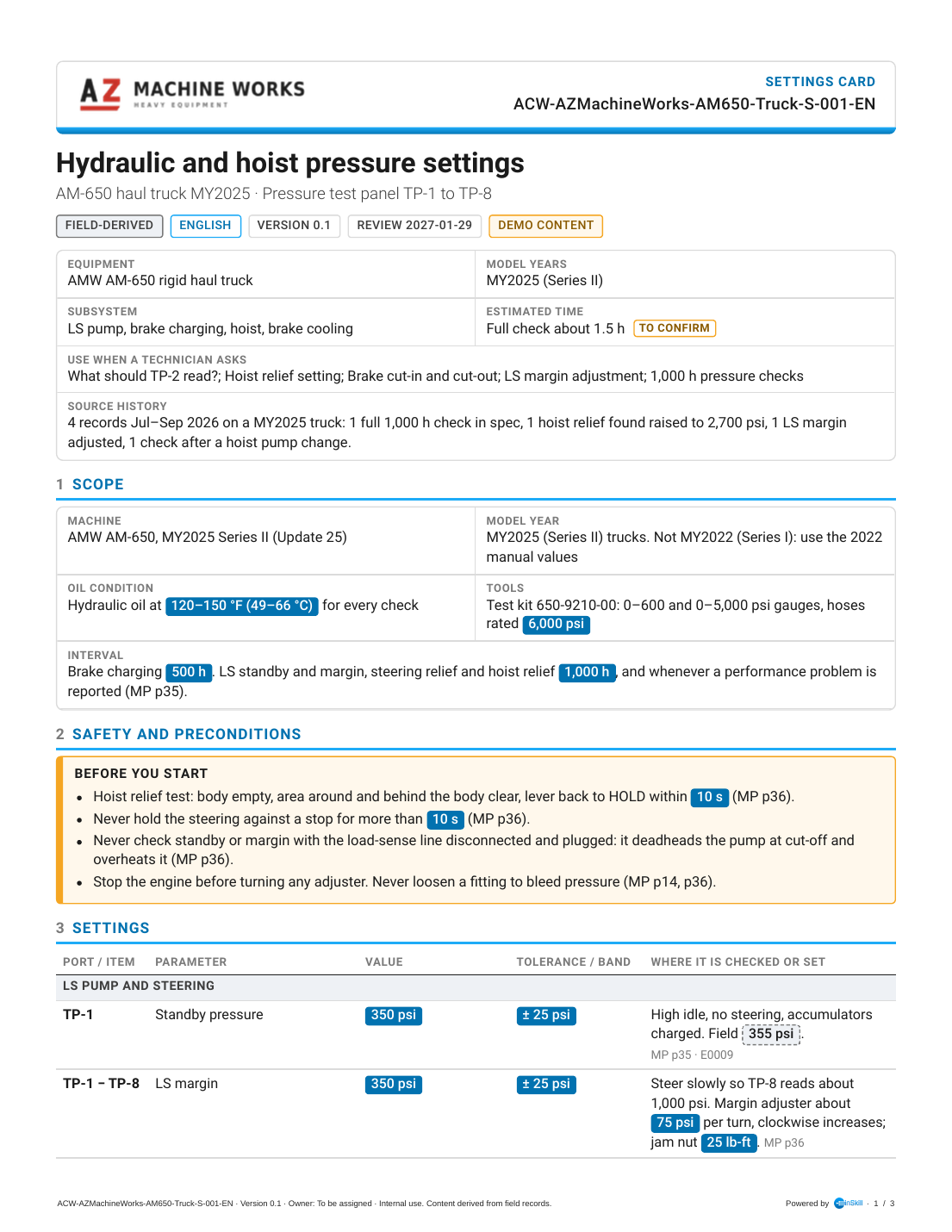
Settings Card S-001, page 1 of 3
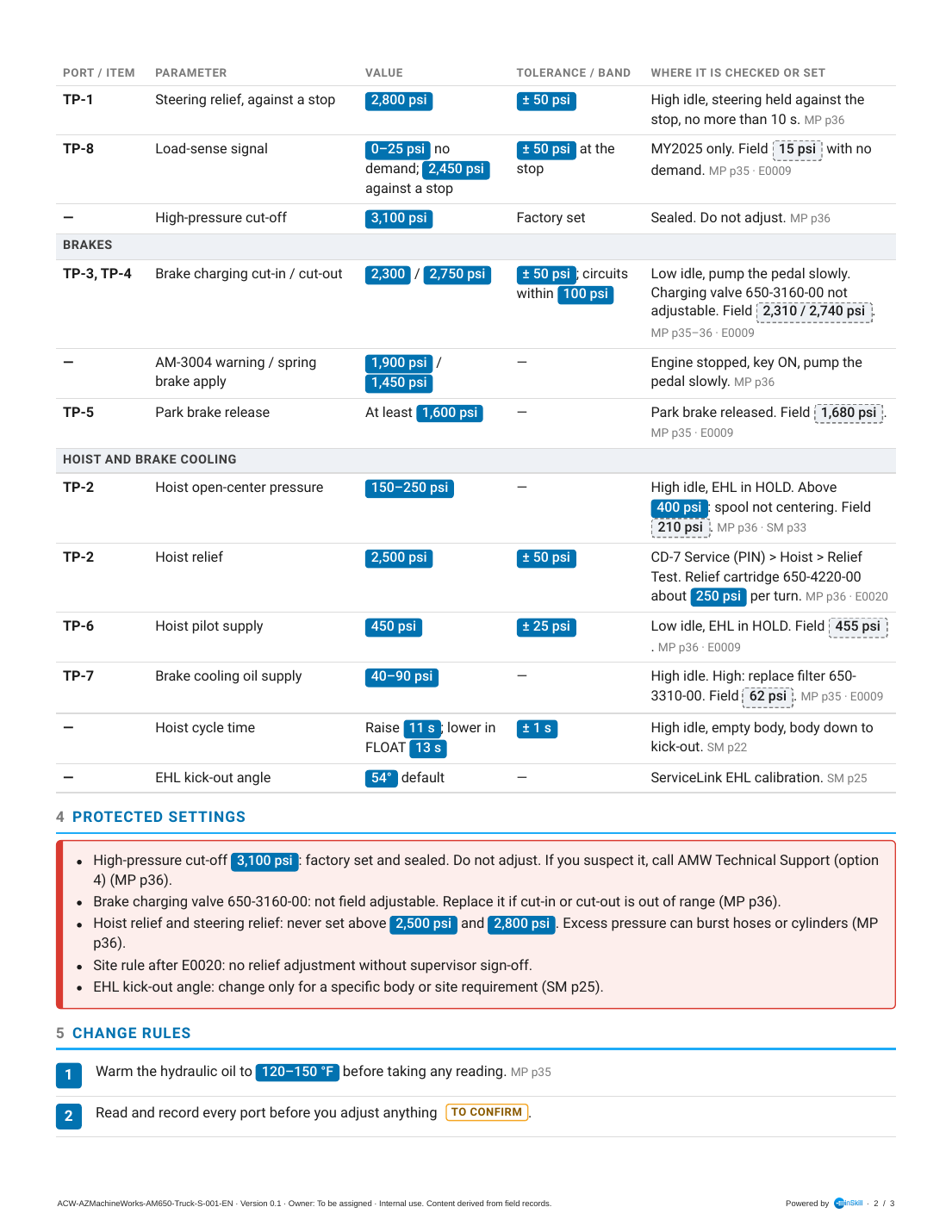
Settings Card S-001, page 2 of 3
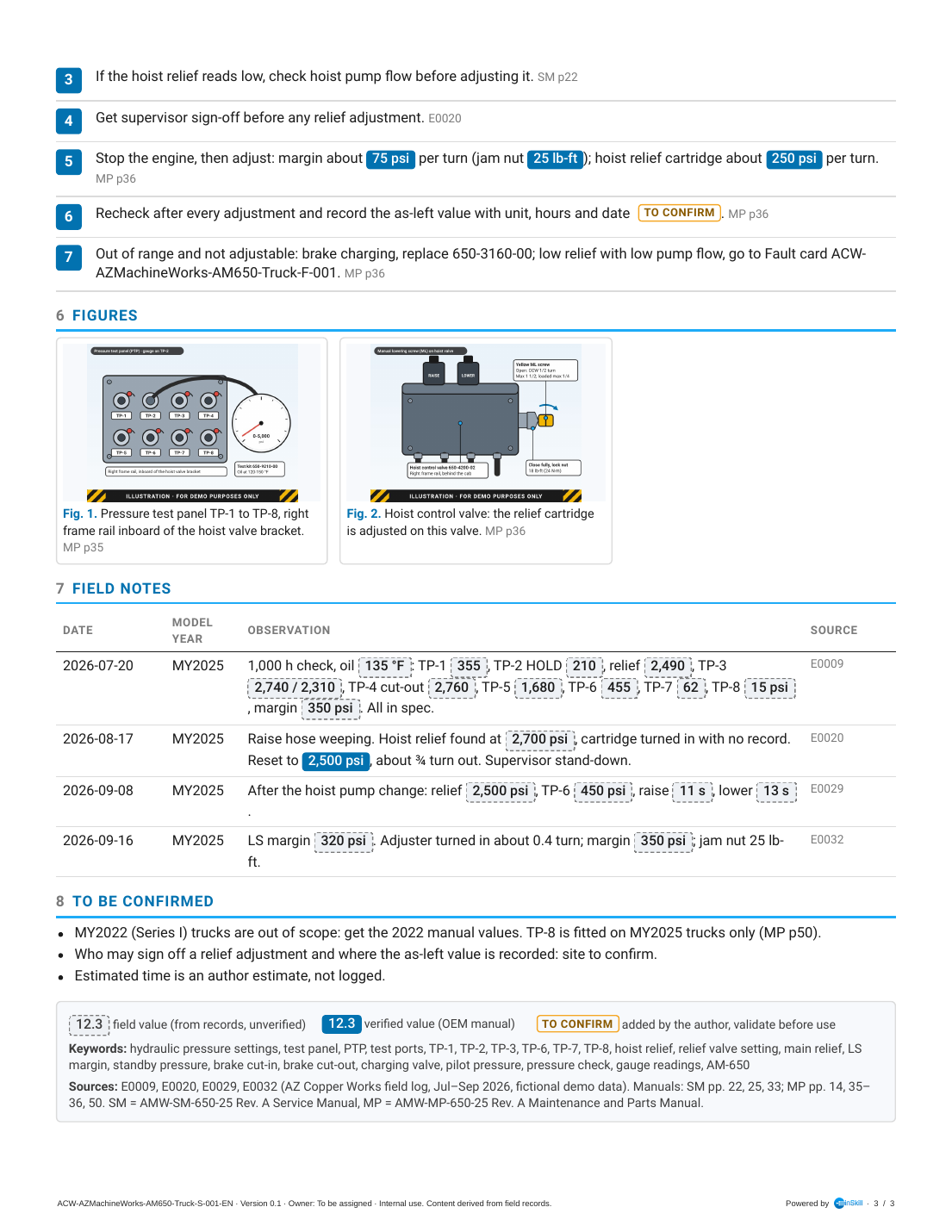
Settings Card S-001, page 3 of 3
What Each Section Covers
A Settings Card is a reference table with guard rails: scope first, then the values, then what must never change and how the rest may.
| Section | What it captures | In this example |
|---|---|---|
| Header and summary box | The customer logo, card type, card ID and chips. Use when a Technician asks lists the questions the card answers. | Settings card; "What should TP-2 read?", "Hoist relief setting", "Brake cut-in and cut-out". |
| 1 Scope | Exactly what the values apply to: machine and model year, the conditions for a valid reading, the tools, and the check interval. | AM-650, MY2025 (Series II) trucks only; oil at 120 to 150 °F; test kit 650-9210-00; 500 h and 1,000 h intervals. |
| 2 Safety and preconditions | The hazards of taking the readings and making adjustments. | Empty body and clear area for the relief test; 10 s limits at the stops; never deadhead the pump. |
| 3 Settings | The core expertise: every setting, grouped by system, with its port, value, tolerance band, and where it is checked or set. Field readings sit beside the maker's values, so drift shows at a glance. | Fourteen settings in three groups, from TP-1 standby at 350 ± 25 psi to the 54° EHL kick-out angle. |
| 4 Protected settings | Settings nobody may change in the field, in a red box: sealed, not adjustable, or capped by the maker, plus site rules learned the hard way. | Sealed 3,100 psi cut-off; charging valve not adjustable; reliefs never above 2,500 and 2,800 psi; no relief adjustment without supervisor sign-off. |
| 5 Change rules | Numbered rules for changing any setting that may be changed: conditions, sign-off, how much one turn changes it, and recording the result. | Warm the oil first, check pump flow before raising a low relief, get sign-off, about 250 psi per turn of the relief cartridge. |
| 6 Figures | Where the settings are read and made. | The pressure test panel and the hoist control valve. |
| 7 Field notes and 8 To be confirmed | The dated readings and changes, and the gaps to close. | A full in-spec check, a relief found at 2,700 psi, a margin adjustment; MY2022 values are out of scope. |
| Legend, keywords and sources | Value tags, keywords and sources. | Keywords include each test port, "main relief" and "gauge readings". |
Example Questions
These questions were asked in Ask on Copilot (Truck) with the card uploaded, and InSkill GPT answered them correctly. Use them to check the card after you upload it.
| Ask this | A good answer covers |
|---|---|
| "What should TP-2 read in HOLD?" | 150 to 250 psi at high idle with the EHL in HOLD; above 400 psi means the spool isn't centering. |
| "Can I turn the hoist relief up to 2,700 psi to lift wet loads?" | No. The hoist relief is never set above 2,500 psi, because excess pressure can burst hoses or cylinders, and any relief adjustment needs supervisor sign-off. |
| "What are the brake charging cut-in and cut-out pressures?" | 2,300 psi and 2,750 psi, ± 50 psi, with the two circuits within 100 psi. The charging valve 650-3160-00 isn't adjustable, so replace it if a reading is out of range. |
How to Create a Settings Card
Settings Cards are created in Claude with the InSkill Field Card Creator skill. It takes the values and tolerances from the maker's manual, puts the field readings beside them, and turns the incidents in the records into protected settings and change rules.
Follow these five stages in order:
Gather the source data
Collect completed check sheets, calibration records and any notes about settings that were found changed. Add the maker's specification tables and adjustment procedures.
The source for this example is a printed check sheet filled in by hand, with a note added later:
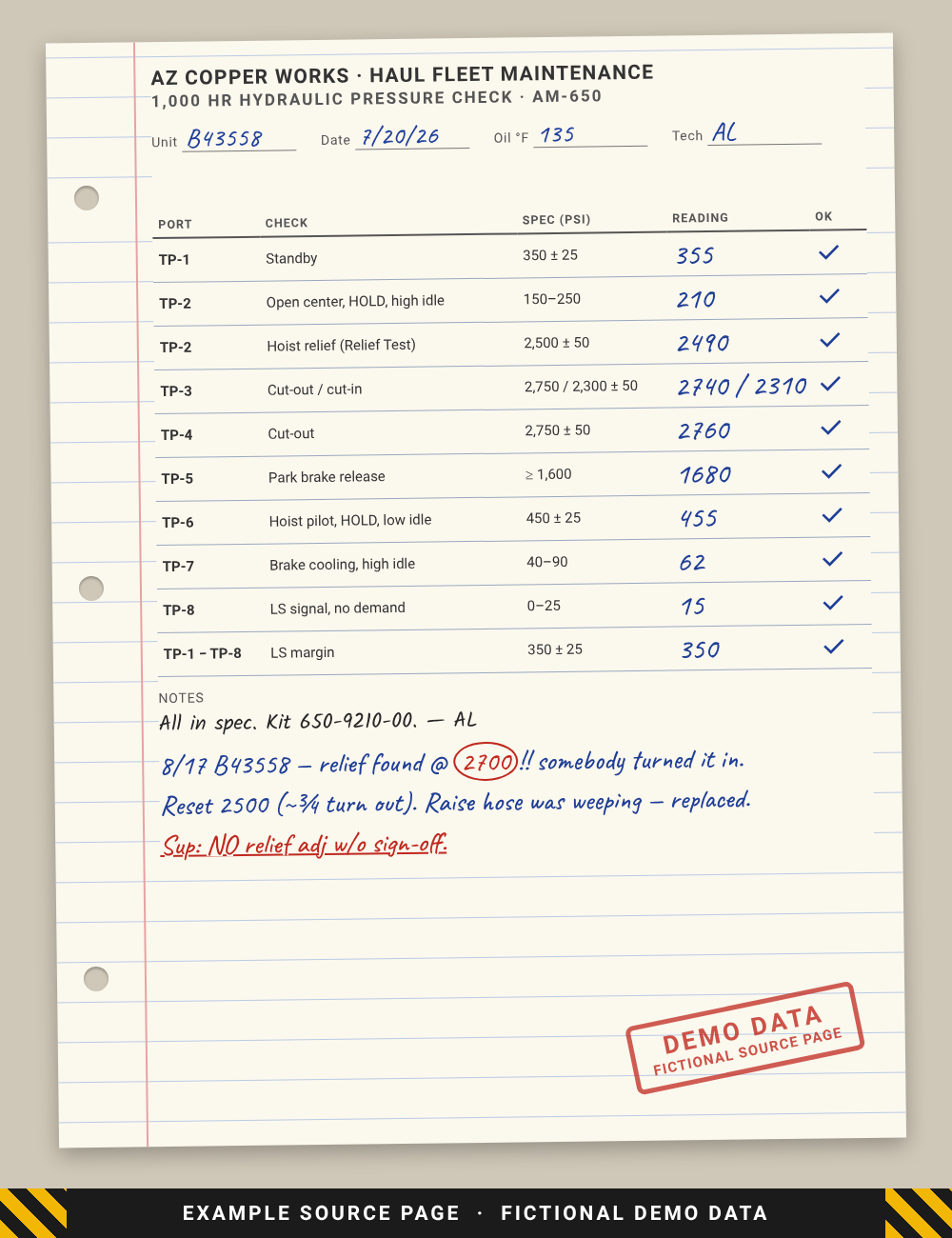
Handwritten pressure check sheet (fictional demo data)
The skill reads the readings and the note and gives each a source ID:
| On the sheet | Source ID | Used for |
|---|---|---|
| Readings TP-1 to TP-8 and the margin, 7/20/26, all in spec | E0009 | Field values in the settings table, field notes |
| 8/17 note: relief found at 2,700, reset to 2,500, no adjustment without sign-off | E0020 | Protected settings, change rules, field notes |
Two more records came from the typed field log:
id,date,shift,unit,tech,area,entry
E0029,2026-09-08,Day,B43558,JM,Hoist,"Hoist slow, raise time 17 s, AM-4018 inactive. ML screw closed. TP-2 210 psi in HOLD. Raise solenoid 730 mA at full RAISE. Flow meter at pump: 52 gpm at 2,100 rpm and 1,000 psi. Replaced hoist pump 650-4305-00. Flow 73 gpm. Relief 2,500 psi. TP-6 450 psi. EHL calibration done. Raise 11 s, lower 13 s."
E0032,2026-09-16,Day,B43558,AL,Hydraulic,"LS margin check: TP-1 minus TP-8 = 320 psi. Margin adjuster turned in about 0.4 turn; margin 350 psi. Jam nut 25 lb-ft."
The manuals used were the AMW-MP-650-25 Maintenance and Parts Manual (pressure test panel and adjustments, pages 35 and 36; 2024 to 2025 changes, page 50) and the AMW-SM-650-25 Service Manual (hoist cycle time, page 22; EHL calibration, page 25).
Run the skill
In Claude, attach the check sheet, the field log, the manuals and the customer logo, and use a prompt like this:
Use the InSkill Field Card Creator skill.

Create a settings card for the hydraulic and hoist pressures read at the pressure
test panel (TP-1 to TP-8) on the AMW AM-650 haul truck, 2025 model year.
- Copilot: Copilot (Truck)
- Site: AZ Copper Works (prefix ACW)
- Keep the card generic to the AM-650: no unit numbers; note model-year differences
- Source: the attached check sheet and field log, July to September 2026
- Take every value and tolerance from the attached AMW-MP-650-25 manual and cite
  the page; show the field readings beside them
- List sealed and non-adjustable settings as protected settings, and turn the
  relief incident into a change rule
- Header: the attached AZ Machine Works logo
Review the card
Before you upload the card, check:
- Every page reads cleanly, no heading is stranded at the bottom of a page, and the card ID fits the header.
- Every field value appears in the source records, and every source ID on the card exists.
- Every value taken from the manual cites its page.
- The To be confirmed list names every gap, and who should close it.
- The settings file has InSkill GPT Answers, App and Web all on.
- The scope names the model years the values apply to, and anything out of scope.
Upload to InSkill
Field cards are uploaded with InSkill GPT Answers, App and Web all on. With App and Web off, InSkill GPT still uses a card, but doesn't show it as a resource in the answer.
- Open the copilot, here Copilot (Truck), and open its Resources tab.
- Click Bulk Upload and add the PDF.
- Under Configure defaults for uploaded files, leave Published on. Under Visibility, leave App, Web and InSkill GPT Answers selected. Under InSkill GPT, leave Searchable and Parse selected.
- Click Create 1 Resources, then Done.
- Open the new resource and set Name, Keywords and Description from the settings file. Leave Prompt empty. Click Save. See Editing Resource Attributes.
NoteClaude can do step 5 for you through the InSkill MCP Server: ask it to apply the
.inskill.jsonsettings file to the uploaded resource.
In this example the resource name is Field Card (Settings) | Hydraulic and hoist pressure settings.
Test the card in Ask
Ask the example questions in Ask on the copilot and check the answers against the card.
Output Reference
Files
The skill writes two files for each card:
| File | What it is |
|---|---|
ACW-AZMachineWorks-AM650-Truck-S-001-EN.pdf | The card: a branded, US Letter PDF. This is the file you upload to InSkill. |
ACW-AZMachineWorks-AM650-Truck-S-001-EN.inskill.json | The settings file: the resource name, keywords, description and visibility to apply in InSkill. |
The skill writes the card in English, even when the source records are in another language. It writes another language version, for example ACW-AZMachineWorks-AM650-Truck-S-001-ES.pdf, only when you ask for one. On request, it also delivers a kit with the template, builder, content files and images, so the card can be rebuilt after edits.
Card ID
Every card ID follows the pattern <Site>-<Brand>-<Model>-<MachineType>-<Code>-<Number>, and each language version adds a suffix:
| Part | In this example | Meaning |
|---|---|---|
| Site | ACW | AZ Copper Works, the site the records come from |
| Brand | AZMachineWorks | The machine maker. Process is used when the maker can't be confirmed from the sources. |
| Model | AM650 | The machine model. Left out when it doesn't apply. |
| Machine type | Truck | The machine type |
| Code | S | Settings card |
| Number | 001 | The card number for this site, maker, model, machine type and code |
| Language | -EN | Added to the file names. English is the base language. |
Value tags
Every value on the card is tagged so Technicians and InSkill GPT know how far to trust it:
| Tag | How it looks on the card | What it means |
|---|---|---|
| Field value | Grey value in a dashed box | Taken from the source records. Not yet confirmed by the maker. |
| Verified value | White value on solid blue | Taken from the maker's manual, or confirmed by the maker. |
| To confirm | Amber label | Added by the author, not found in the sources. Validate it before anyone relies on it. |
Status, version and review
| Item | In this example | Rule |
|---|---|---|
| Status | Field-derived | A new card is always Field-derived. It becomes OEM verified once the maker confirms its values and the To be confirmed list is closed. |
| Version | 0.1 | The first version is 0.1. |
| Review date | 2027-01-29 | No more than 90 days after the card is made. |
| Owner | To be assigned | The person who keeps the card current. |
Settings file
The settings file for this Settings Card:
{
  "card_id": "ACW-AZMachineWorks-AM650-Truck-S-001",
  "resource_title": "Field Card (Settings) | Hydraulic and hoist pressure settings",
  "language": "en",
  "base_language": "en",
  "is_base": true,
  "translation_group": "ACW-AZMachineWorks-AM650-Truck-S-001",
  "card_type": "settings",
  "status": "field",
  "version": "0.1",
  "review_date": "2027-01-29",
  "owner": "To be assigned",
  "copilot": "Copilot (Truck)",
  "visibility": {"vis_mvn": true, "vis_web": true, "vis_app": true},
  "keywords": ["hydraulic pressure settings", "test panel", "PTP", "test ports", "TP-1", "TP-2", "TP-3", "TP-6", "TP-7", "TP-8", "hoist relief", "relief valve setting", "main relief", "LS margin", "standby pressure", "brake cut-in", "brake cut-out", "charging valve", "pilot pressure", "pressure check", "gauge readings", "AM-650"],
  "mvn_desc": "Hydraulic and hoist pressure settings. Settings card for the AMW AM-650 rigid haul truck.",
  "source_entries": "E0009, E0020, E0029, E0032 (AZ Copper Works field log, Jul–Sep 2026, fictional demo data). Manuals: SM pp. 22, 25, 33; MP pp. 14, 35–36, 50. SM = AMW-SM-650-25 Rev. A Service Manual, MP = AMW-MP-650-25 Rev. A Maintenance and Parts Manual.",
  "file": "ACW-AZMachineWorks-AM650-Truck-S-001-EN.pdf"
}| Field | What it holds | Where it goes in InSkill |
|---|---|---|
card_id | The card ID without the language suffix | Shown on the card and in its file names |
resource_title | Field Card, the card type in parentheses, a vertical bar, and the title | The resource Name |
language, base_language, is_base | The language of this file. English is the base language, so only the English file has is_base: true. | A non-English card is added on the Languages tab of the English resource |
translation_group | The card ID shared by every language version of the card | Links the language versions together |
card_type | fault, procedure, atlas, alarm, settings, parts or lockout | The card type shown in the header |
status | field (Field-derived) or verified (OEM verified) | The status chip on the card |
version, review_date, owner | The card version, the date it must be reviewed by (90 days at most), and its owner | Shown on the card and in its footer |
copilot | The copilot the card belongs to | The copilot you upload the card to |
visibility | vis_mvn: true, vis_web: true, vis_app: true | Visibility: InSkill GPT Answers, App and Web all on |
keywords | Terms Technicians use, including slang and part numbers | Keywords |
mvn_desc | One line: the card title, the card type and the equipment | Description |
source_entries | The source records and manual pages behind the card | Audit trail; not uploaded |
file | The PDF file name | File |
Updated about 6 hours ago