
Lockout Card
A complete Lockout Card for the AM-650 haul truck, what each of its sections captures, and how to build one from handwritten safety notes with the InSkill Field Card Creator skill.
A Lockout Card covers isolating every energy source on one machine before work starts: what the energy sources are, where each one is isolated, the order to lock out, how to prove zero energy, and the order to restore. It carries the site's near-miss lessons alongside the maker's procedure. For how Lockout Cards fit with the other card types, see Field Cards.
This page shows a complete Lockout Card, explains what each section captures, and then shows how to create one with the InSkill Field Card Creator skill.
NoteThe example is built from fictional AZ Copper Works records and the AZ Machine Works AM-650 manuals. Its pictures are illustrations marked For demo purposes only. A Lockout Card supports the site's lockout program; it does not replace it.
The Example Card
| Item | Detail |
|---|---|
| Card ID | ACW-AZMachineWorks-AM650-Truck-O-001-EN |
| Title | Lockout and tagout: AM-650 haul truck |
| Copilot | Copilot (Truck), AZ Machine Works |
| Equipment | AMW AM-650 rigid haul truck |
| Scope | Whole truck: battery disconnect, accumulators, body, wheels |
| Model years | MY2025 (Series II) and MY2022 (Series I); values from the 2025 manuals |
| Pages | 3 |
| Status | Field-derived, version 0.1, review by 2027-01-29 |
| Source | AZ Copper Works field records, July to September 2026 (fictional demo data), checked against the AMW AM-650 2025 service manual (SM) and maintenance and parts manual (MP) |
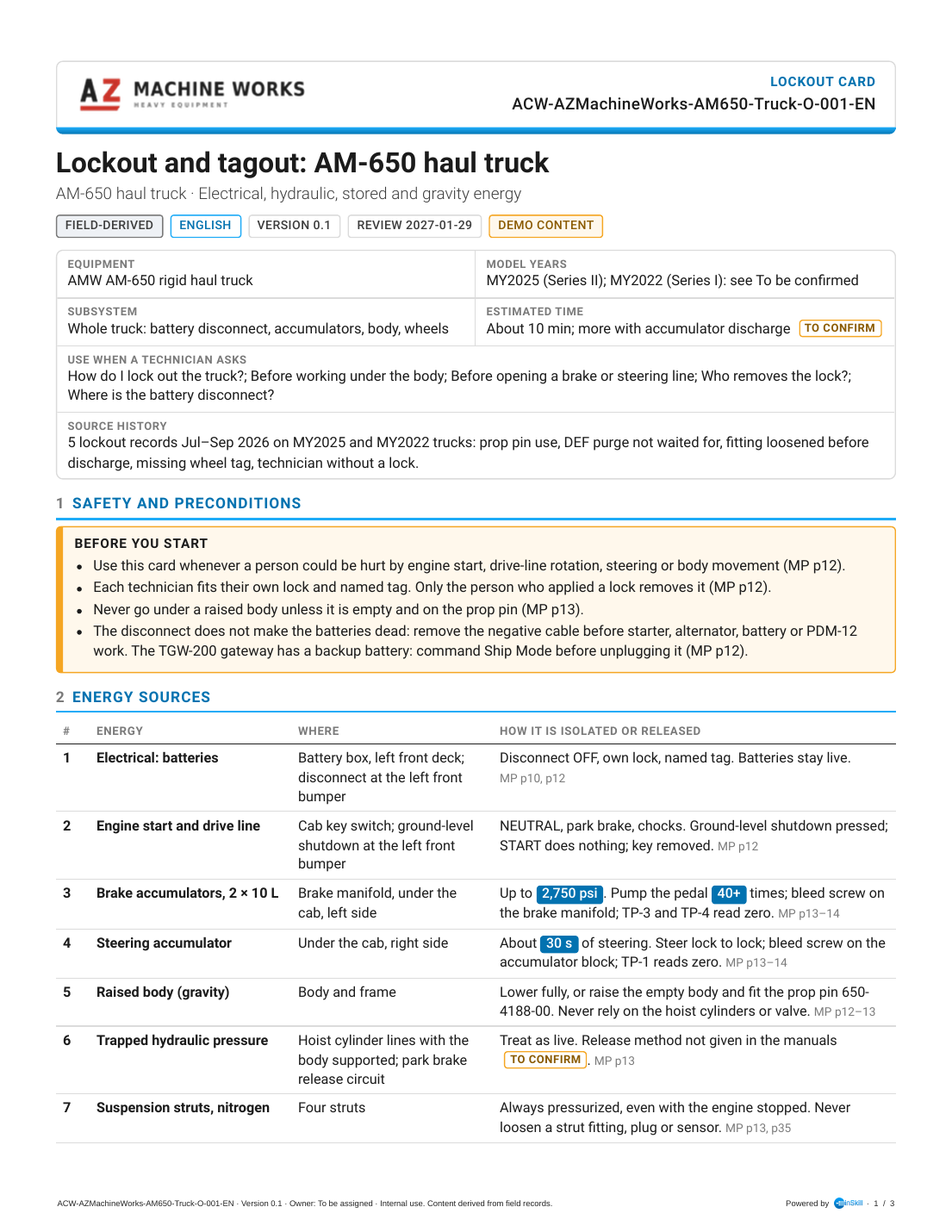
Lockout Card O-001, page 1 of 3
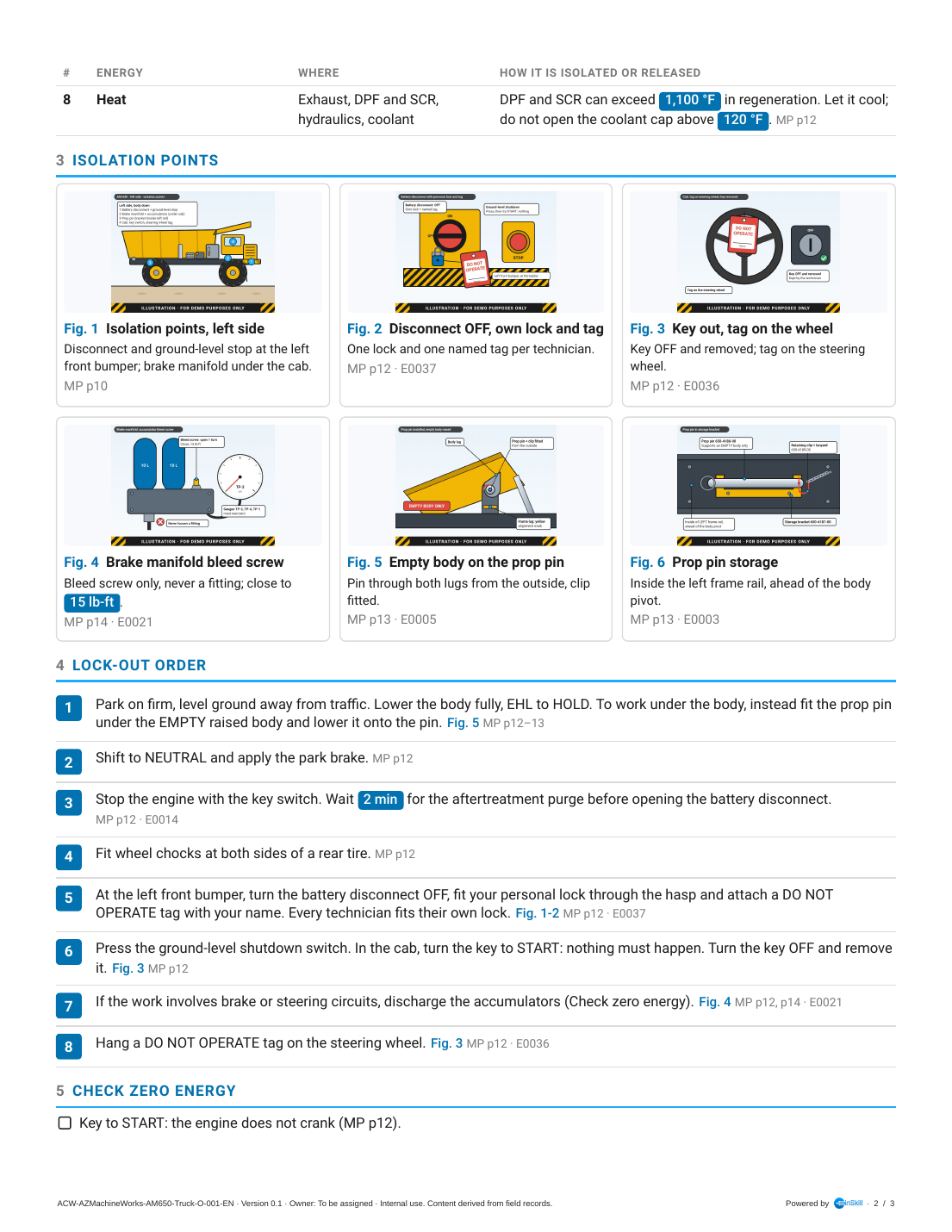
Lockout Card O-001, page 2 of 3
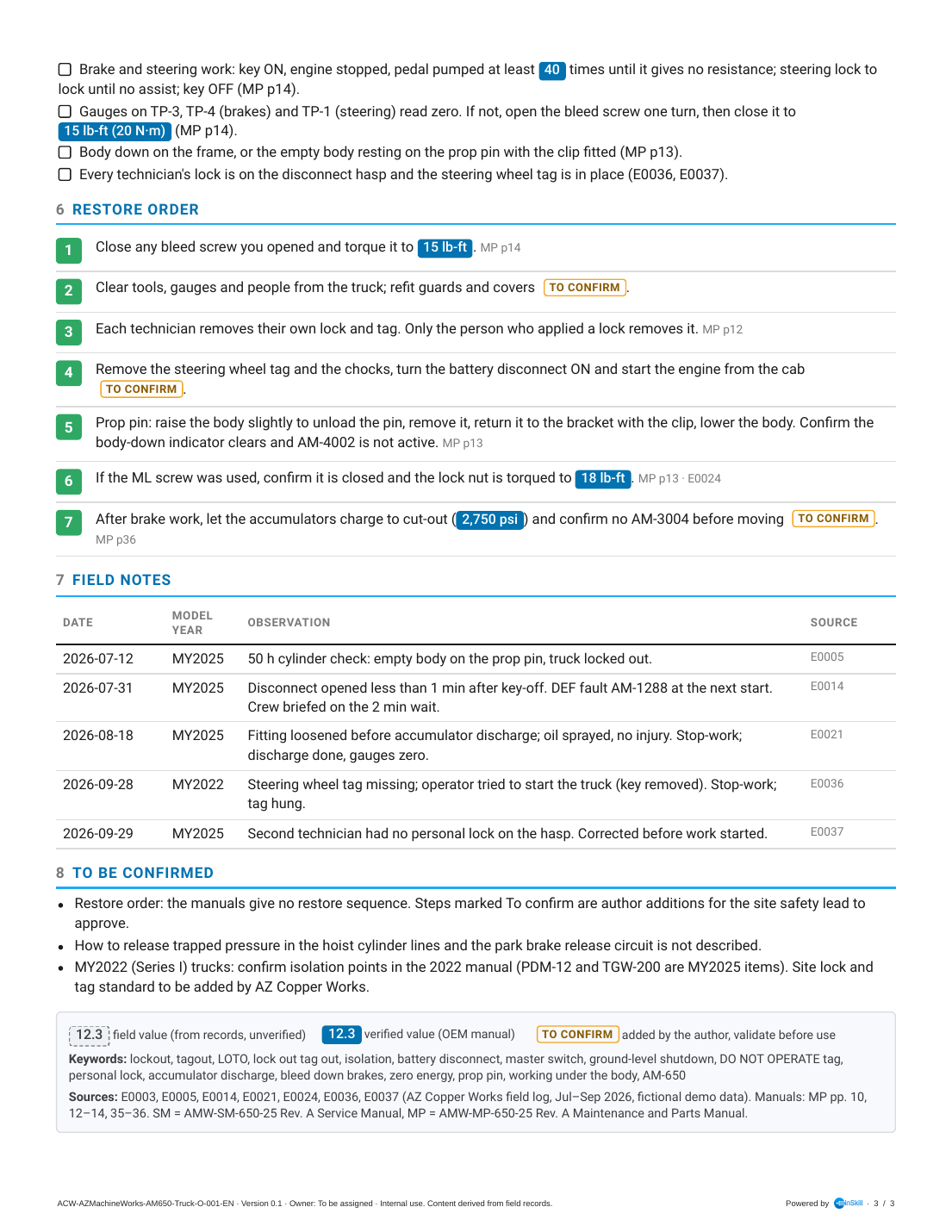
Lockout Card O-001, page 3 of 3
What Each Section Covers
A Lockout Card follows the order of the job itself: know the energy, find the isolation points, lock out, prove zero, and later restore.
| Section | What it captures | In this example |
|---|---|---|
| Header and summary box | The customer logo, card type, card ID and chips. Use when a Technician asks lists the lockout questions the card answers. | Lockout card; "How do I lock out the truck?", "Before working under the body", "Who removes the lock?". |
| 1 Safety and preconditions | When the card applies, the personal-lock rule, and hazards that isolation doesn't remove. | Each Technician fits their own lock and tag; the batteries stay live with the disconnect off; the telematics gateway has its own battery. |
| 2 Energy sources | Every energy source on the machine: what it is, where it is, and how it is isolated or released, including the energy that can't be released. | Eight sources, from batteries and brake accumulators at 2,750 psi to nitrogen struts that are always pressurized and hot aftertreatment. |
| 3 Isolation points | A picture of each isolation point, so a Technician new to the machine can find it. | The left-side isolation map, battery disconnect with lock and tag, key and steering wheel tag, bleed screw, prop pin installed and stored. |
| 4 Lock-out order | The numbered order to isolate, one action per step, with the field lessons built in. | Eight steps from the maker, including the 2-minute wait for the aftertreatment purge before opening the disconnect. |
| 5 Check zero energy | The checks that prove the machine is safe before anyone starts work. | Key to START does nothing; accumulators discharged; gauges on TP-3, TP-4 and TP-1 read zero; every lock on the hasp. |
| 6 Restore order | The order to put the machine back in service, in green. Steps the maker doesn't give are tagged To confirm for the site safety lead. | Seven steps, from closing the bleed screw to letting the accumulators charge before moving. |
| 7 Field notes | The site's near misses and corrections, dated and factual. | Disconnect opened before the purge, a fitting loosened under pressure, a missing wheel tag, a Technician without a lock. |
| 8 To be confirmed | Gaps the safety lead must close. | The restore order; releasing trapped hoist-line pressure; MY2022 trucks; the site lock standard. |
| Legend, keywords and sources | Value tags, keywords and sources. | Keywords include "LOTO", "master switch" and "bleed down brakes". |
Example Questions
These questions were asked in Ask on Copilot (Truck) with the card uploaded, and InSkill GPT answered them correctly. Use them to check the card after you upload it.
| Ask this | A good answer covers |
|---|---|
| "How do I lock out the AM-650 haul truck?" | The full lock-out order: body down or on the prop pin, NEUTRAL and park brake, engine off and a 2-minute wait, wheel chocks, battery disconnect OFF with your own lock and named tag, ground-level shutdown and the START check, accumulators discharged for brake or steering work, and a tag on the steering wheel. |
| "Can I open the battery disconnect right after I shut the engine off?" | No. Wait 2 minutes for the aftertreatment purge first. |
| "My buddy already locked out the truck. Do I need my own lock?" | Yes. Every Technician fits their own lock and tag. |
How to Create a Lockout Card
Lockout Cards are created in Claude with the InSkill Field Card Creator skill. It takes the energy sources and the lock-out order from the maker's safety chapter, and adds the site's near misses as warnings and field notes. It never shortens or reorders the maker's steps.
Follow these five stages in order:
Gather the source data
Collect the maker's lockout and stored-energy procedures, and the site's safety records for the machine: stand-downs, near misses and audit findings.
The source for this example is a page of handwritten safety notes:
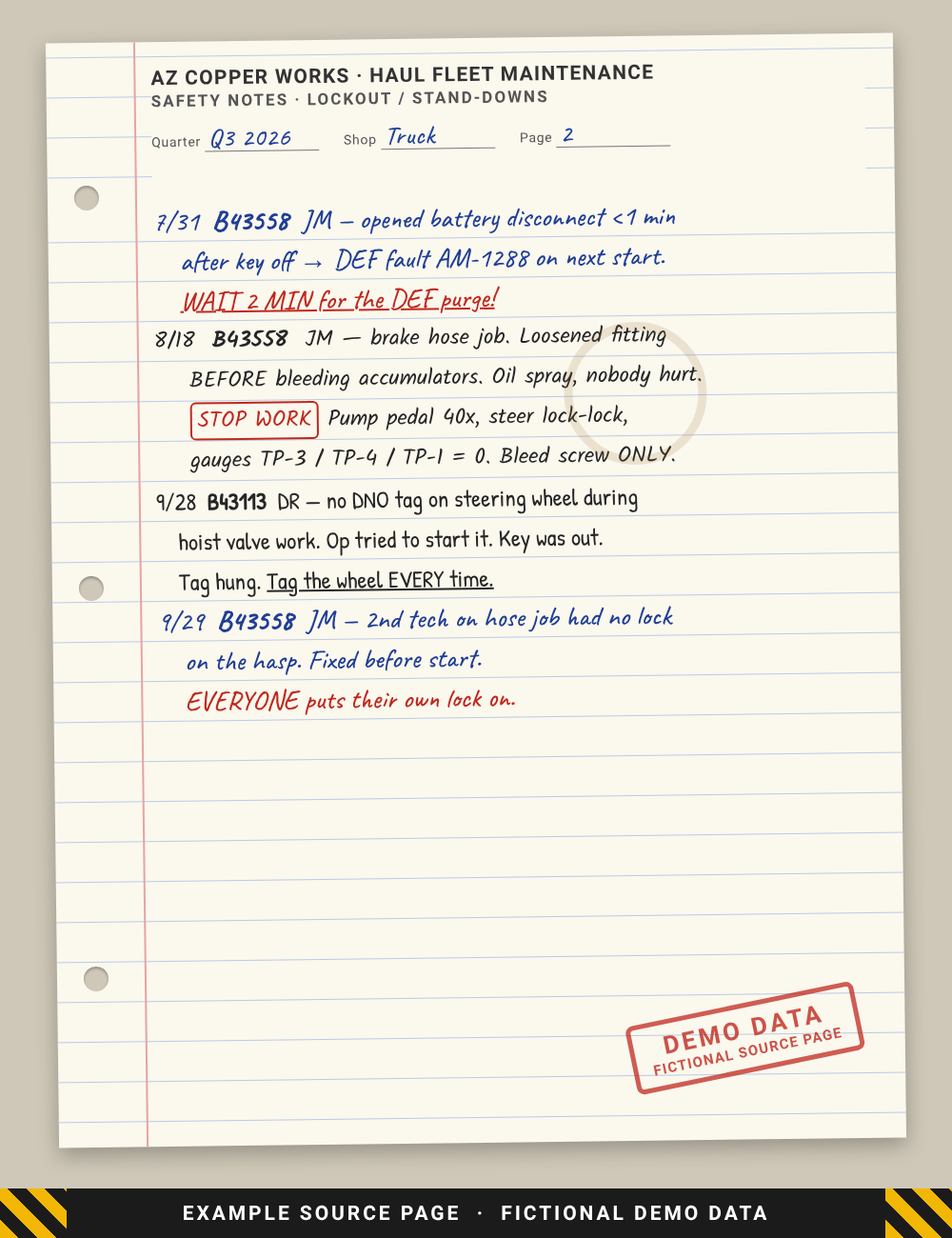
Handwritten safety notes page (fictional demo data)
The skill reads the handwriting and gives every entry a source ID:
| Handwritten entry | Source ID | Used for |
|---|---|---|
| 7/31 B43558 JM: disconnect opened under 1 min after key off, DEF fault | E0014 | Lock-out step 3, field notes |
| 8/18 B43558 JM: fitting loosened before bleeding the accumulators | E0021 | Zero-energy check, isolation point Fig. 4, field notes |
| 9/28 B43113 DR: no tag on the steering wheel | E0036 | Lock-out step 8, zero-energy check |
| 9/29 B43558 JM: second Technician with no lock on the hasp | E0037 | Safety, lock-out step 5 |
Two more records came from the typed field log:
id,date,shift,unit,tech,area,entry
E0003,2026-07-08,Day,B43558,JM,Body,"Prop pin found in its bracket on the left frame rail without the retaining clip lanyard; clip loose on the deck. Replaced clip 650-4189-00. Photo of the storage bracket taken."
E0005,2026-07-12,Day,B43558,JM,Body,"50 h hoist cylinder visual check. Raised empty body to the yellow alignment mark, prop pin installed through frame and body lugs, clip fitted, body lowered onto the pin, locked out. No leaks on either cylinder. Photo of pin installed."
The manual used was the AMW-MP-650-25 Maintenance and Parts Manual (maintenance safety, lockout and tagout, prop pin and stored energy, pages 12 to 14; component locations, page 10).
Run the skill
In Claude, attach the notes, the field log, the manual and the customer logo, and use a prompt like this:
Use the InSkill Field Card Creator skill.

Create a lockout card for the AMW AM-650 haul truck.
- Copilot: Copilot (Truck)
- Site: AZ Copper Works (prefix ACW)
- Keep the card generic to the AM-650: no unit numbers; note model-year differences
- Source: the attached handwritten safety notes and field log, July to September 2026
- Take the energy sources, isolation points and lock-out order from the attached
  AMW-MP-650-25 manual, pages 12 to 14, and cite the page; never shorten or
  reorder the maker's steps
- Add each near miss as a warning and a field note
- Tag any restore step the manual doesn't give as To confirm
- Header: the attached AZ Machine Works logo
Review the card
Before you upload the card, check:
- Every page reads cleanly, no heading is stranded at the bottom of a page, and the card ID fits the header.
- Every field value appears in the source records, and every source ID on the card exists.
- Every value taken from the manual cites its page.
- The To be confirmed list names every gap, and who should close it.
- The settings file has InSkill GPT Answers, App and Web all on.
- The site safety lead approves the card, including every To confirm step, before it is uploaded.
Upload to InSkill
Field cards are uploaded with InSkill GPT Answers, App and Web all on. With App and Web off, InSkill GPT still uses a card, but doesn't show it as a resource in the answer.
- Open the copilot, here Copilot (Truck), and open its Resources tab.
- Click Bulk Upload and add the PDF.
- Under Configure defaults for uploaded files, leave Published on. Under Visibility, leave App, Web and InSkill GPT Answers selected. Under InSkill GPT, leave Searchable and Parse selected.
- Click Create 1 Resources, then Done.
- Open the new resource and set Name, Keywords and Description from the settings file. Leave Prompt empty. Click Save. See Editing Resource Attributes.
NoteClaude can do step 5 for you through the InSkill MCP Server: ask it to apply the
.inskill.jsonsettings file to the uploaded resource.
In this example the resource name is Field Card (Lockout) | Lockout and tagout: AM-650 haul truck.
Test the card in Ask
Ask the example questions in Ask on the copilot and check the answers against the card. Check that every answer gives the full lock-out order, never a shortened one.
Output Reference
Files
The skill writes two files for each card:
| File | What it is |
|---|---|
ACW-AZMachineWorks-AM650-Truck-O-001-EN.pdf | The card: a branded, US Letter PDF. This is the file you upload to InSkill. |
ACW-AZMachineWorks-AM650-Truck-O-001-EN.inskill.json | The settings file: the resource name, keywords, description and visibility to apply in InSkill. |
The skill writes the card in English, even when the source records are in another language. It writes another language version, for example ACW-AZMachineWorks-AM650-Truck-O-001-ES.pdf, only when you ask for one. On request, it also delivers a kit with the template, builder, content files and images, so the card can be rebuilt after edits.
Card ID
Every card ID follows the pattern <Site>-<Brand>-<Model>-<MachineType>-<Code>-<Number>, and each language version adds a suffix:
| Part | In this example | Meaning |
|---|---|---|
| Site | ACW | AZ Copper Works, the site the records come from |
| Brand | AZMachineWorks | The machine maker. Process is used when the maker can't be confirmed from the sources. |
| Model | AM650 | The machine model. Left out when it doesn't apply. |
| Machine type | Truck | The machine type |
| Code | O | Lockout card |
| Number | 001 | The card number for this site, maker, model, machine type and code |
| Language | -EN | Added to the file names. English is the base language. |
Value tags
Every value on the card is tagged so Technicians and InSkill GPT know how far to trust it:
| Tag | How it looks on the card | What it means |
|---|---|---|
| Field value | Grey value in a dashed box | Taken from the source records. Not yet confirmed by the maker. |
| Verified value | White value on solid blue | Taken from the maker's manual, or confirmed by the maker. |
| To confirm | Amber label | Added by the author, not found in the sources. Validate it before anyone relies on it. |
Status, version and review
| Item | In this example | Rule |
|---|---|---|
| Status | Field-derived | A new card is always Field-derived. It becomes OEM verified once the maker confirms its values and the To be confirmed list is closed. |
| Version | 0.1 | The first version is 0.1. |
| Review date | 2027-01-29 | No more than 90 days after the card is made. |
| Owner | To be assigned | The person who keeps the card current. |
Settings file
The settings file for this Lockout Card:
{
  "card_id": "ACW-AZMachineWorks-AM650-Truck-O-001",
  "resource_title": "Field Card (Lockout) | Lockout and tagout: AM-650 haul truck",
  "language": "en",
  "base_language": "en",
  "is_base": true,
  "translation_group": "ACW-AZMachineWorks-AM650-Truck-O-001",
  "card_type": "lockout",
  "status": "field",
  "version": "0.1",
  "review_date": "2027-01-29",
  "owner": "To be assigned",
  "copilot": "Copilot (Truck)",
  "visibility": {"vis_mvn": true, "vis_web": true, "vis_app": true},
  "keywords": ["lockout", "tagout", "LOTO", "lock out tag out", "isolation", "battery disconnect", "master switch", "ground-level shutdown", "DO NOT OPERATE tag", "personal lock", "accumulator discharge", "bleed down brakes", "zero energy", "prop pin", "working under the body", "AM-650"],
  "mvn_desc": "Lockout and tagout: AM-650 haul truck. Lockout card for the AMW AM-650 rigid haul truck.",
  "source_entries": "E0003, E0005, E0014, E0021, E0024, E0036, E0037 (AZ Copper Works field log, Jul–Sep 2026, fictional demo data). Manuals: MP pp. 10, 12–14, 35–36. SM = AMW-SM-650-25 Rev. A Service Manual, MP = AMW-MP-650-25 Rev. A Maintenance and Parts Manual.",
  "file": "ACW-AZMachineWorks-AM650-Truck-O-001-EN.pdf"
}| Field | What it holds | Where it goes in InSkill |
|---|---|---|
card_id | The card ID without the language suffix | Shown on the card and in its file names |
resource_title | Field Card, the card type in parentheses, a vertical bar, and the title | The resource Name |
language, base_language, is_base | The language of this file. English is the base language, so only the English file has is_base: true. | A non-English card is added on the Languages tab of the English resource |
translation_group | The card ID shared by every language version of the card | Links the language versions together |
card_type | fault, procedure, atlas, alarm, settings, parts or lockout | The card type shown in the header |
status | field (Field-derived) or verified (OEM verified) | The status chip on the card |
version, review_date, owner | The card version, the date it must be reviewed by (90 days at most), and its owner | Shown on the card and in its footer |
copilot | The copilot the card belongs to | The copilot you upload the card to |
visibility | vis_mvn: true, vis_web: true, vis_app: true | Visibility: InSkill GPT Answers, App and Web all on |
keywords | Terms Technicians use, including slang and part numbers | Keywords |
mvn_desc | One line: the card title, the card type and the equipment | Description |
source_entries | The source records and manual pages behind the card | Audit trail; not uploaded |
file | The PDF file name | File |
Updated about 6 hours ago