
InSkill Ask Web App
InSkill Ask is the browser workspace where Technicians find a copilot, ask it questions, run tasks, and review past sessions.
InSkill Ask is the browser workspace for Technicians. From one place you can find the copilot that covers the equipment in front of you, ask InSkill GPT a question, open a task, read source documents, and go back over earlier sessions.
Ask replaces the earlier InSkill portal. Everything the portal did, Ask does, and it adds search across every copilot, a per-copilot workspace, and a session history you can filter.
What you will need:
- A desktop computer or laptop
- An InSkill account with access to at least one copilot
Opening Ask
Go to expert.inskill.ai and sign in. Select the portal name in the top-left corner, then select Ask.
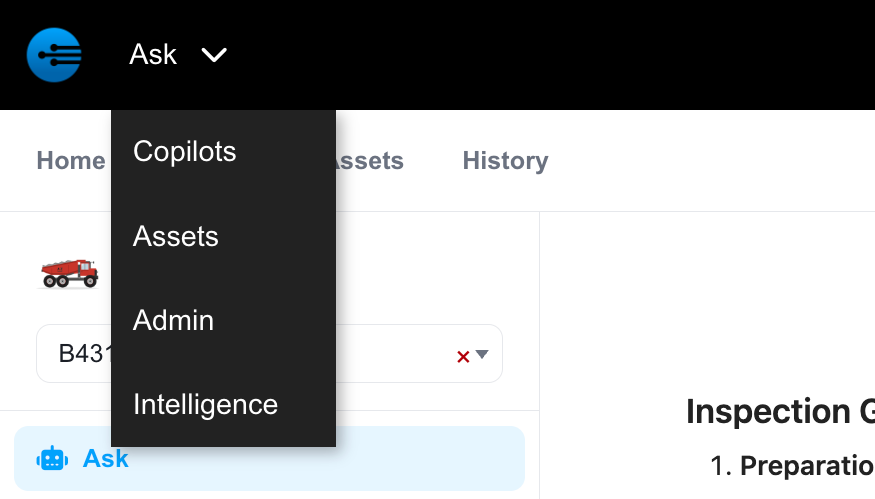
Opening Ask from the portal switcher
The Ask Tabs
Ask has four tabs across the top, plus a settings control on the right.
| Tab | What it is for |
|---|---|
| Home | Search every copilot at once, and reopen the sessions you were last working in. |
| Copilots | Browse the copilots you have access to and open one. |
| Assets | Browse individual assets by name or serial number and open one. |
| History | Review your sessions, from the InSkill app and Ask, filtered by type or handoff. |
In This Section
| Page | What it covers |
|---|---|
| The Ask Home Page | Search, and picking up where you left off. |
| Copilots and Assets | Finding a copilot or a specific asset. |
| Asking a Question | Starting a session, session filters, and reading an answer. |
| Tasks and Resources | Opening tasks and source documents from the copilot sidebar. |
| Session History and Settings | Reviewing past sessions and changing InSkill Settings. |
Updated about 4 hours ago